

With more photorealistic outputs, stronger prompt understanding, better consistency, and translation capabilities, GPT Image 2.0 helps creators, marketers, and businesses produce more reliable visuals.
ChatGPT Image 2.0 shows a major leap in instruction following, turning complex prompts into well-structured visuals. It organizes elements with clear hierarchy, layout, and composition. From multiple objects to detailed scene descriptions, everything is arranged in a logical and visually balanced way. This makes GPT Image 2.0 especially effective for creating polished visuals that feel thoughtfully designed. To achieve these professional results instantly, explore our collection of ready-to-use GPT Image 2 prompts.
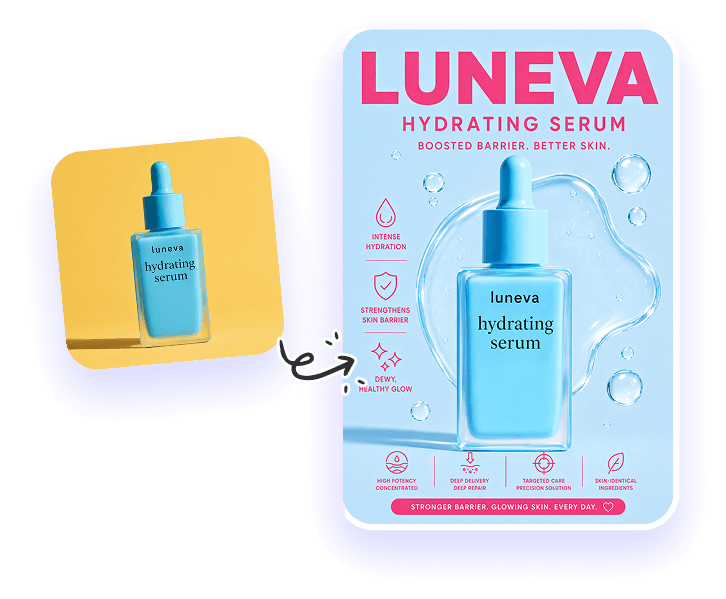
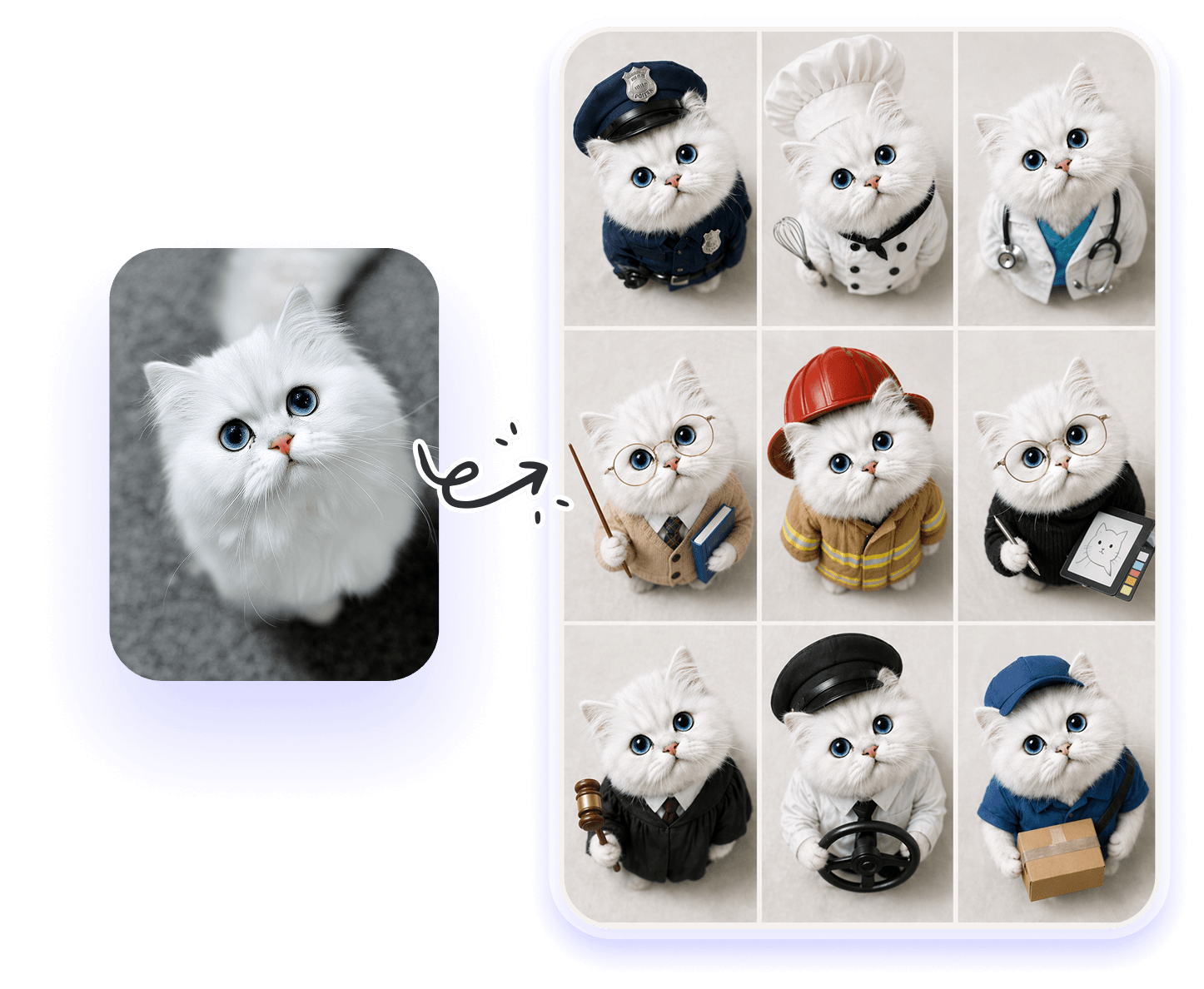
The newly updated GPT Image 2.0 delivers strong consistency across multiple images, even when generating variations of the same subject or scene. Styles, characters, and visual elements remain aligned, making it easier to create a cohesive set of visuals. This is especially useful for content creators building visual series, marketers running multi-asset campaigns, designers working on brand systems, and teams producing consistent visuals at scale.
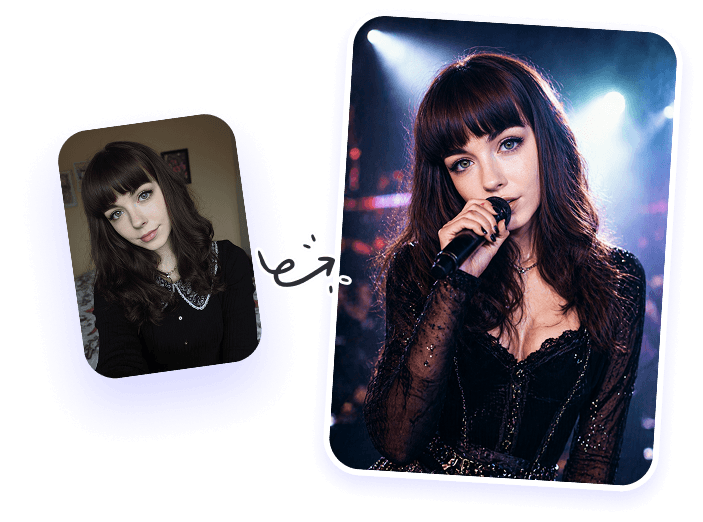
AI-generated images often suffer from unrealistic lighting, awkward compositions, or scenes that don’t quite make sense. ChatGPT Image 2.0 addresses these issues by better understanding how the real world works, delivering more natural lighting, balanced layouts, and more believable scenes. Whether it’s product-style visuals, structured diagrams, or cinematic-style images, the results feel more intentional and grounded.
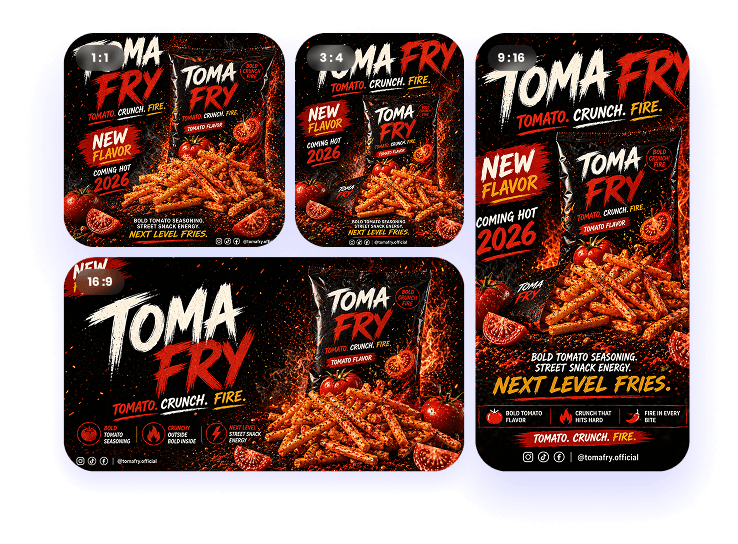
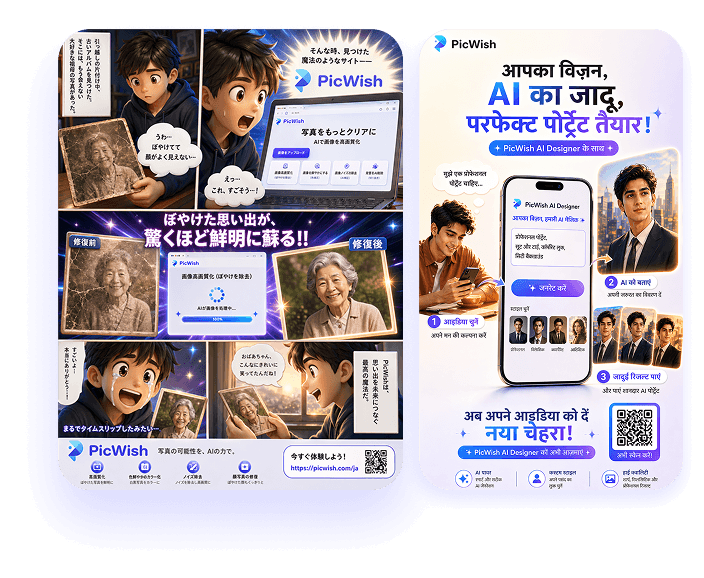
Selection and editing features set ChatGPT Image apart from other AI image models, and with GPT Image 2.0, they’ve taken a clear step forward. It now supports adjusting aspect ratios after generation, from 1:1 to 21:9, and allows you to remove backgrounds with simple instructions. PicWish AI Designer, now integrated with GPT Image 2.0, lets you go beyond basic edits, including background removal, image expansion, object removal, and unblurring images.
ChatGPT Image 2.0 significantly improves text rendering, producing clearer and more readable text within images. It minimizes common issues like distorted or incorrect characters seen in earlier models. The model also handles multiple languages more effectively, with better support for non-Latin languages such as Chinese, Japanese, Korean, and Hindi. This makes it especially useful for creating localized visuals across e-commerce, marketing, and global campaigns.
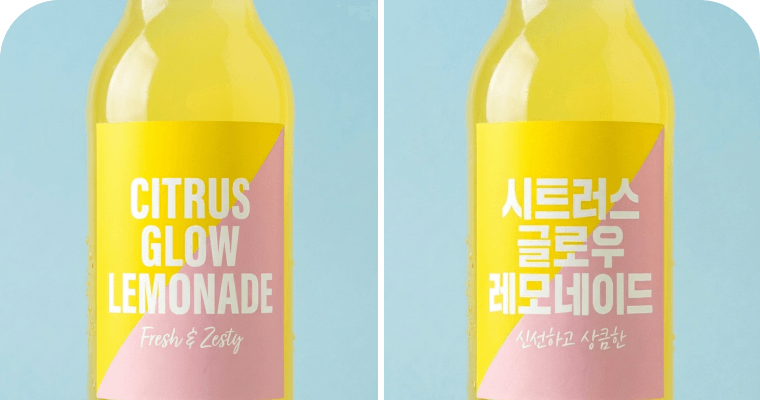
Accurately translate text within product images, ensuring pixel-perfect replacement for instant global sales
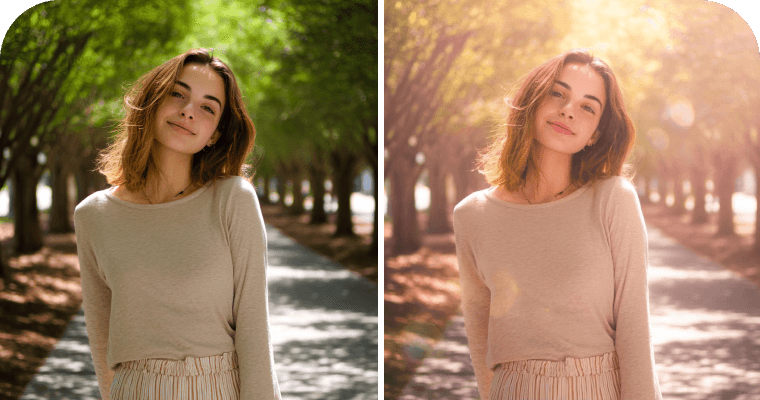
Achieve photorealistic precision by transforming flat photos into high-impact cinematic visuals
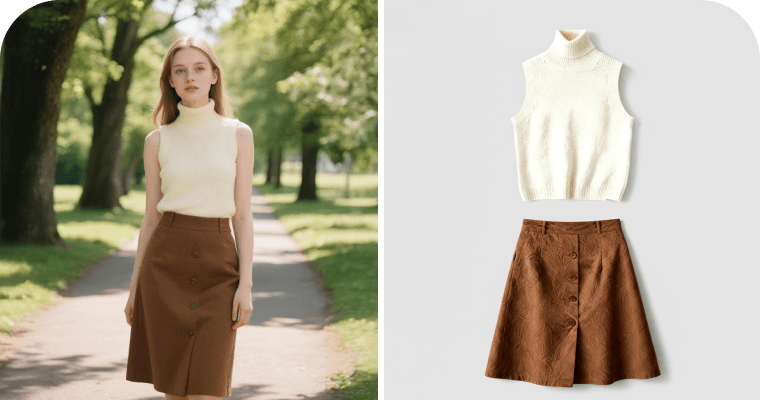
ChatGPT Image 2.0 photo editor extracts outfits from photos, generating flat-lay fashion images ready for e-commerce
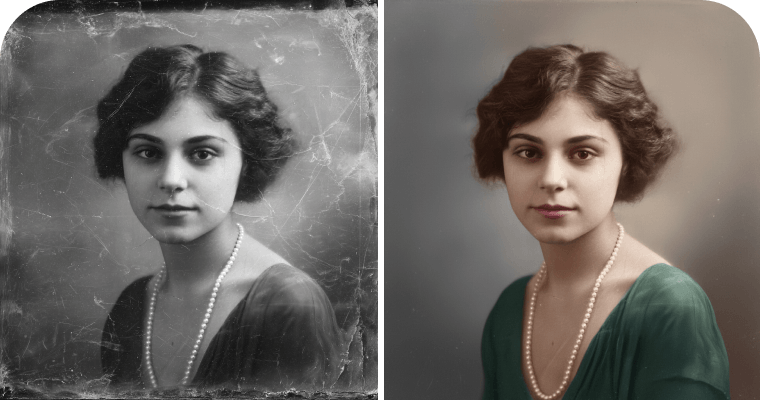
ChatGPT Image 2.0 model instantly repairs damaged photos and colorizes black-and-white memories with stunning quality
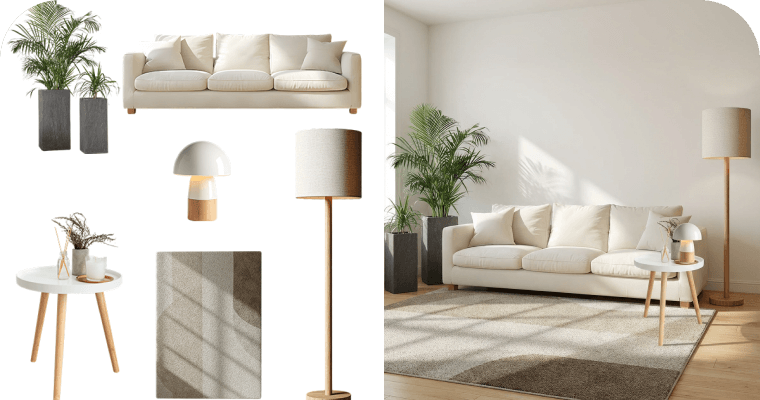
Seamlessly fuse multiple products into ultra-realistic scenes with consistent lighting
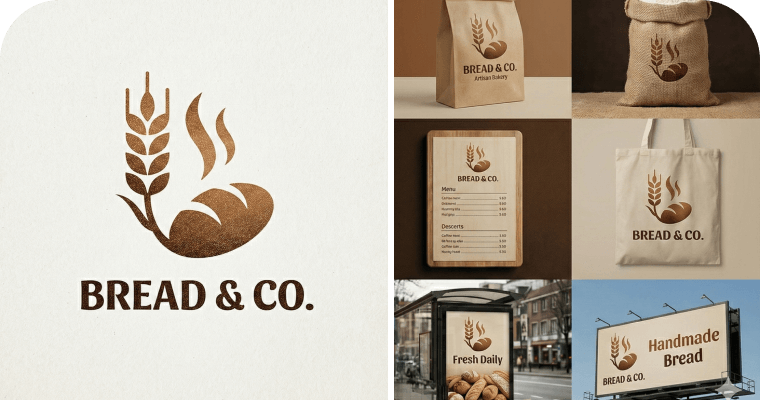
Generate a comprehensive image suite from a single input, guaranteeing brand consistency
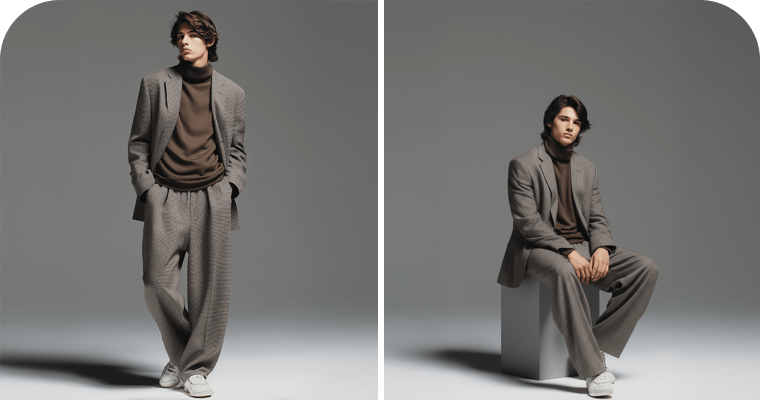
Use ChatGPT Image 2.0 to place characters or pets into new poses, preserving their original looks and identities
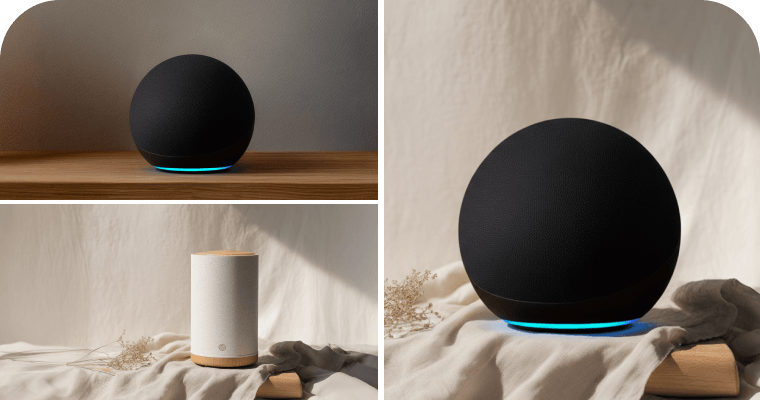
Seamlessly replace products into new backgrounds using the ChatGPT Image 2.0 generator, creating stunning assets for marketing campaigns
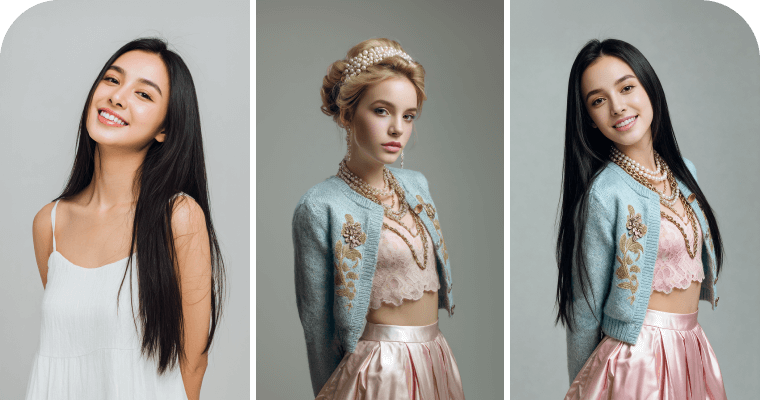
ChatGPT Image 2.0 transfers clothes and postures onto a different person. Brand new visuals without a photoshoot
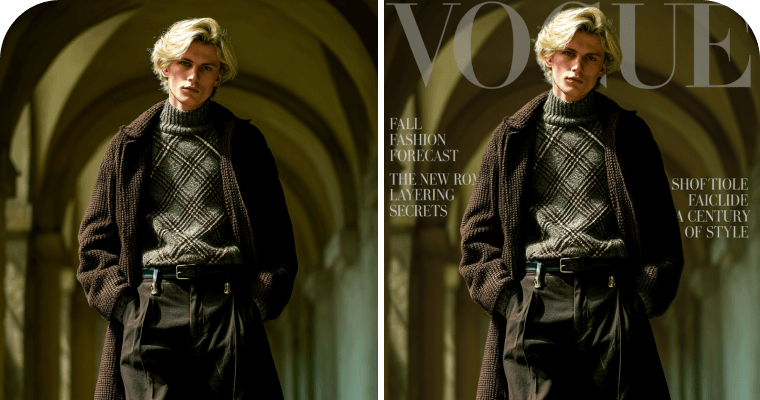
Turn portraits into magazine-style posters with the ChatGPT Image 2.0 generator, adding artistic flair in one click
Accurately translate text within product images, ensuring pixel-perfect replacement for instant global sales
Achieve photorealistic precision by transforming flat photos into high-impact cinematic visuals
ChatGPT Image 2.0 photo editor extracts outfits from photos, generating flat-lay fashion images ready for e-commerce
ChatGPT Image 2.0 model instantly repairs damaged photos and colorizes black-and-white memories with stunning quality
Seamlessly fuse multiple products into ultra-realistic scenes with consistent lighting
Generate a comprehensive image suite from a single input, guaranteeing brand consistency
Use ChatGPT Image 2.0 to place characters or pets into new poses, preserving their original looks and identities
Seamlessly replace products into new backgrounds using the ChatGPT Image 2.0 generator, creating stunning assets for marketing campaigns
ChatGPT Image 2.0 transfers clothes and postures onto a different person. Brand new visuals without a photoshoot
Turn portraits into magazine-style posters with the ChatGPT Image 2.0 generator, adding artistic flair in one click
GPT Image 2.0
Nano Banana Pro
GPT Image 1.5
Compared to Nano Banana Pro and GPT Image 1.5, GPT Image 2.0 introduces more advanced reasoning capabilities, along with improved control and structured image generation.
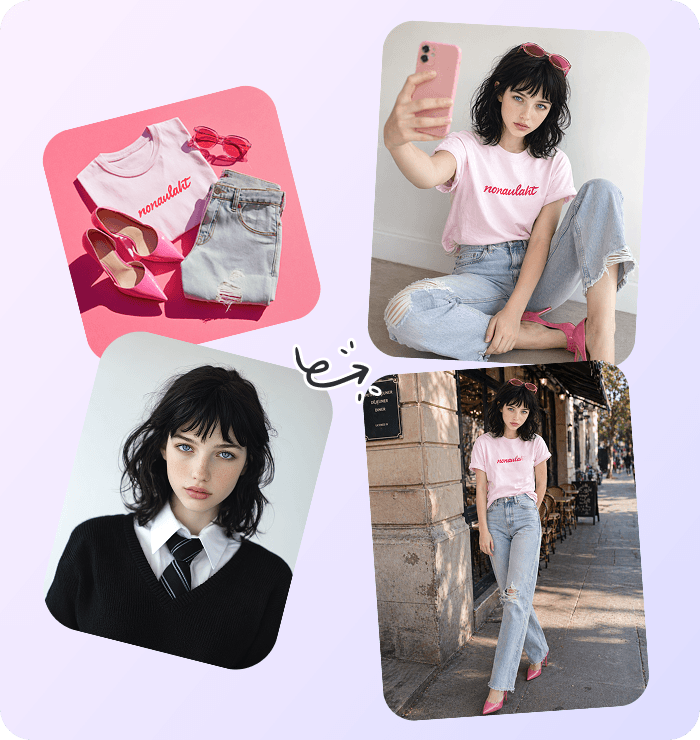
Create high-quality, consistent visuals for real-world workflows, from marketing and content creation to design, education, and beyond.
'/%3e%3cpath%20d='M43.6302%2040.8206L23.1802%2040.6706L19.4102%2025.6406H48.3302L43.6302%2040.8206Z'%20stroke='white'%20stroke-width='2'%20stroke-linecap='round'%20stroke-linejoin='round'/%3e%3cpath%20d='M43.1999%2045.1272H24.2599L18.6399%2023.2072C17.9899%2020.6572%2015.6799%2018.8672%2013.0499%2018.8672H10.4199'%20stroke='white'%20stroke-width='2'%20stroke-linecap='round'%20stroke-linejoin='round'/%3e%3cpath%20d='M27.7296%2051.7287C29.4583%2051.7287%2030.8596%2050.3274%2030.8596%2048.5987C30.8596%2046.8701%2029.4583%2045.4688%2027.7296%2045.4688C26.001%2045.4688%2024.5996%2046.8701%2024.5996%2048.5987C24.5996%2050.3274%2026.001%2051.7287%2027.7296%2051.7287Z'%20stroke='white'%20stroke-width='2'%20stroke-linecap='round'%20stroke-linejoin='round'/%3e%3cpath%20d='M39.6202%2051.7287C41.3489%2051.7287%2042.7502%2050.3274%2042.7502%2048.5987C42.7502%2046.8701%2041.3489%2045.4688%2039.6202%2045.4688C37.8916%2045.4688%2036.4902%2046.8701%2036.4902%2048.5987C36.4902%2050.3274%2037.8916%2051.7287%2039.6202%2051.7287Z'%20stroke='white'%20stroke-width='2'%20stroke-linecap='round'%20stroke-linejoin='round'/%3e%3cpath%20d='M37.5207%2031.4062C37.5207%2033.4162%2035.8907%2035.0563%2033.8707%2035.0563C31.8507%2035.0563%2030.2207%2033.4262%2030.2207%2031.4062'%20stroke='white'%20stroke-linecap='round'%20stroke-linejoin='round'/%3e%3cdefs%3e%3clinearGradient%20id='paint0_linear_90908_9938'%20x1='11.08'%20y1='3.67'%20x2='54.53'%20y2='62.51'%20gradientUnits='userSpaceOnUse'%3e%3cstop%20stop-color='%23608EFF'/%3e%3cstop%20offset='1'%20stop-color='%235457FC'/%3e%3c/linearGradient%3e%3c/defs%3e%3c/svg%3e)
Create listing images, lifestyle mockups, and product variations that improve conversions.
'/%3e%3cpath%20d='M17%2034.5V46.5'%20stroke='white'%20stroke-width='2'%20stroke-linecap='round'/%3e%3cpath%20d='M27%2028.5V46.5'%20stroke='white'%20stroke-width='2'%20stroke-linecap='round'/%3e%3cpath%20d='M47%2023.5V46.5'%20stroke='white'%20stroke-width='2'%20stroke-linecap='round'/%3e%3cpath%20d='M16%2031L26.0294%2022L34.9191%2026.25L47%2017'%20stroke='white'%20stroke-width='2'%20stroke-linecap='round'/%3e%3cpath%20d='M38%2030.5V46.5'%20stroke='white'%20stroke-width='2'%20stroke-linecap='round'/%3e%3cdefs%3e%3clinearGradient%20id='paint0_linear_90908_9927'%20x1='11.08'%20y1='3.67'%20x2='54.53'%20y2='62.51'%20gradientUnits='userSpaceOnUse'%3e%3cstop%20stop-color='%23608EFF'/%3e%3cstop%20offset='1'%20stop-color='%235457FC'/%3e%3c/linearGradient%3e%3c/defs%3e%3c/svg%3e)
Design ad banners, social posts, and campaign visuals with consistent branding.
'/%3e%3cpath%20d='M32.2627%2021.6484C34.8998%2021.6525%2037.3713%2022.6197%2039.1328%2024.3994L39.1367%2024.4023C40.9303%2026.1959%2042.0331%2028.6883%2042.0332%2031.293C42.0332%2034.1992%2040.7952%2036.9406%2038.4854%2038.7051H38.4844L38.4785%2038.71C36.8734%2039.9557%2035.959%2041.9339%2035.959%2043.7461V47.2402C35.9588%2047.9067%2035.3501%2048.5156%2034.6836%2048.5156H30.1133C29.6516%2048.5156%2028.8379%2048.0918%2028.8379%2046.7725V43.583C28.8378%2041.7057%2027.9068%2040.0866%2026.5225%2038.8867L26.4814%2038.8535L26.252%2038.6699C23.925%2036.7537%2022.7678%2034.1067%2022.7637%2031.1465C22.897%2025.9262%2027.1657%2021.7817%2032.2627%2021.6484Z'%20stroke='white'%20stroke-width='2'%20stroke-linecap='round'%20stroke-linejoin='round'/%3e%3cpath%20d='M37.5207%2031.4062C37.5207%2033.4162%2035.8907%2035.0563%2033.8707%2035.0563C31.8507%2035.0563%2030.2207%2033.4262%2030.2207%2031.4062'%20stroke='white'%20stroke-linecap='round'%20stroke-linejoin='round'/%3e%3cpath%20d='M20.1172%2043.5424L22.0267%2041.6328'%20stroke='white'%20stroke-width='2'%20stroke-linecap='round'%20stroke-linejoin='round'/%3e%3cpath%20d='M44.392%2043.6205L42.4824%2041.7109'%20stroke='white'%20stroke-width='2'%20stroke-linecap='round'%20stroke-linejoin='round'/%3e%3cpath%20d='M15%2031.0781L17.6815%2031.1391'%20stroke='white'%20stroke-width='2'%20stroke-linecap='round'%20stroke-linejoin='round'/%3e%3cpath%20d='M49.6756%2031.0781L46.9941%2031.1391'%20stroke='white'%20stroke-width='2'%20stroke-linecap='round'%20stroke-linejoin='round'/%3e%3cpath%20d='M44.7181%2019.1406L42.8086%2021.0096'%20stroke='white'%20stroke-width='2'%20stroke-linecap='round'%20stroke-linejoin='round'/%3e%3cpath%20d='M19.8359%2019.0625L21.7455%2020.9517'%20stroke='white'%20stroke-width='2'%20stroke-linecap='round'%20stroke-linejoin='round'/%3e%3cpath%20d='M32.1445%2014V16.6815'%20stroke='white'%20stroke-width='2'%20stroke-linecap='round'%20stroke-linejoin='round'/%3e%3cdefs%3e%3clinearGradient%20id='paint0_linear_90908_9949'%20x1='11.08'%20y1='3.67'%20x2='54.53'%20y2='62.51'%20gradientUnits='userSpaceOnUse'%3e%3cstop%20stop-color='%23608EFF'/%3e%3cstop%20offset='1'%20stop-color='%235457FC'/%3e%3c/linearGradient%3e%3c/defs%3e%3c/svg%3e)
Create illustrations, covers, and visuals that enhance storytelling and engagement.
'/%3e%3cpath%20d='M41.5862%2027H22.4138C20.5284%2027%2019%2028.717%2019%2030.835V41.165C19%2043.283%2020.5284%2045%2022.4138%2045H41.5862C43.4716%2045%2045%2043.283%2045%2041.165V30.835C45%2028.717%2043.4716%2027%2041.5862%2027Z'%20stroke='white'%20stroke-width='2'%20stroke-linecap='round'%20stroke-linejoin='round'/%3e%3cpath%20d='M35.5207%2034.4062C35.5207%2036.4162%2033.8907%2038.0563%2031.8707%2038.0563C29.8507%2038.0563%2028.2207%2036.4262%2028.2207%2034.4062'%20stroke='white'%20stroke-linecap='round'%20stroke-linejoin='round'/%3e%3cpath%20d='M28.5832%2045.7578L27.7773%2047.748'%20stroke='white'%20stroke-width='2'%20stroke-linecap='round'%20stroke-linejoin='round'/%3e%3cpath%20d='M35.6035%2045.7578L36.3971%2047.748'%20stroke='white'%20stroke-width='2'%20stroke-linecap='round'%20stroke-linejoin='round'/%3e%3cpath%20d='M24.5059%2048.4219H40.0241'%20stroke='white'%20stroke-width='2'%20stroke-linecap='round'%20stroke-linejoin='round'/%3e%3cpath%20d='M25%2026.5L25.4199%2025.376C26.2013%2023.8742%2027.7519%2022.9219%2029.449%2022.9219H34.7846C36.2619%2022.9219%2037.6416%2023.6422%2038.484%2024.8388L39.5%2026.5'%20stroke='white'%20stroke-width='2'%20stroke-linecap='round'%20stroke-linejoin='round'/%3e%3cpath%20d='M32.4406%2014.9297H31.9645C30.2787%2014.9297%2028.9121%2016.2963%2028.9121%2017.9821V19.4472C28.9121%2021.133%2030.2787%2022.4996%2031.9645%2022.4996H32.4406C34.1264%2022.4996%2035.493%2021.133%2035.493%2019.4472V17.9821C35.493%2016.2963%2034.1264%2014.9297%2032.4406%2014.9297Z'%20stroke='white'%20stroke-width='2'%20stroke-linecap='round'%20stroke-linejoin='round'/%3e%3cdefs%3e%3clinearGradient%20id='paint0_linear_90908_9960'%20x1='11.08'%20y1='3.67'%20x2='54.53'%20y2='62.51'%20gradientUnits='userSpaceOnUse'%3e%3cstop%20stop-color='%23608EFF'/%3e%3cstop%20offset='1'%20stop-color='%235457FC'/%3e%3c/linearGradient%3e%3c/defs%3e%3c/svg%3e)
Generate UI mockups, layouts, and product visuals to speed up design workflows.
'/%3e%3cpath%20d='M45.22%2036.4503V29.7603M45.25%2029.7603L46.87%2029.1803C47.24%2029.0503%2047.49%2028.6903%2047.49%2028.3003C47.49%2027.9103%2047.24%2027.5503%2046.87%2027.4203L32.06%2022.0603C31.85%2021.9903%2031.63%2021.9903%2031.42%2022.0603L16.62%2027.4203C16.25%2027.5503%2016%2027.9003%2016%2028.3003C16%2028.6903%2016.24%2029.0503%2016.61%2029.1803L22.07%2031.2003V37.3803C22.07%2037.5703%2022.13%2037.7603%2022.24%2037.9203C22.3%2038.0103%2022.87%2038.7903%2024.33%2039.5203C26.18%2040.4503%2028.6%2040.9203%2031.53%2040.9203C34.46%2040.9203%2036.9%2040.4503%2038.77%2039.5203C40.25%2038.7903%2040.84%2038.0203%2040.9%2037.9303C41.02%2037.7703%2041.08%2037.5803%2041.08%2037.3803V31.2603L43.36%2030.4403'%20stroke='white'%20stroke-width='2'%20stroke-linecap='round'%20stroke-linejoin='round'/%3e%3cpath%20d='M22.0801%2031.1978L31.8601%2034.5878L45.2501%2029.7578'%20stroke='white'%20stroke-width='2'%20stroke-linecap='round'%20stroke-linejoin='round'/%3e%3cpath%20d='M45.2495%2037.0234L48.1095%2039.8934L45.2495%2042.7634L42.2695%2039.9434L45.2495%2037.0234Z'%20stroke='white'%20stroke-width='2'%20stroke-linecap='round'%20stroke-linejoin='round'/%3e%3cdefs%3e%3clinearGradient%20id='paint0_linear_90908_9976'%20x1='11.08'%20y1='3.67'%20x2='54.53'%20y2='62.51'%20gradientUnits='userSpaceOnUse'%3e%3cstop%20stop-color='%23608EFF'/%3e%3cstop%20offset='1'%20stop-color='%235457FC'/%3e%3c/linearGradient%3e%3c/defs%3e%3c/svg%3e)
Create diagrams, concept visuals, and learning materials that simplify complex ideas.




