

It can be really annoying to see an unwanted double chin in pictures, especially if you’ve worked hard to acquire the ideal lighting and angle. Thankfully, there are ways to remove double chin from photo online free, allowing you to manage and even eliminate it from your images. This article will cover the common causes of the emergence of a double chin, how to avoid it, and how to utilize online tools to remove it step-by-step.
- What Causes Double Chin on Photos?
- Remove Double Chin from Photo Using Online Tools
- Comparison Table
- Tips to Avoid Double Chin on Photos
What Causes Double Chin on Photos?
The first step of removing double chins in images is to understand what makes them become visible. These are a few common reasons:
- Camera Angles: Shooting from a low angle can create shadows that make a double chin more noticeable.
- Lighting: Poor lighting can draw attention to specific parts of the neck, creating the appearance of a bigger chin.
- Posture: The skin in the chin area naturally pulls forward when the head is bent over or tilted downward, giving the appearance of a double chin.
- Natural Facial Structure and Weight Distribution: Some people’s jawlines naturally have more skin or fat, which can be highlighted in pictures. Fortunately, there are effective techniques to remove double chin from photo online free for a more refined look.
Remove Double Chin from Photo Using Online Tools
If you’ve already taken a photo and want to remove the double chin, here are a few easy-to-use online tools:
PicWish
PicWish offers one of the easiest tools to use in removing double chin from photos online with its AI Designer. Everything runs through a simple prompt which means there is no need for manual edits or advanced technical skills. Users just need to upload their image and type in their prompt or use its new one-click presets that automatically generate prompts, letting the AI instantly apply their described changes. PicWish’s AI Designer is supported by AI models which users can choose from: Nano Banana Pro, Nano Banana, and Seedream 4.0. Aside from that, they can also choose the aspect ratio and adjust the output resolution of the image results, giving them control over the final look while still keeping the process quick and easy.
Here are the steps on how to remove double chin from Photo using PicWish:
- First, visit the PicWish AI Designer page.
- Next, choose and upload the image that you want to edit.

- Click on AI Edit and select Remove double chin. Upon selection, PicWish’s preconfigured prompt will appear and automatically choose the most suitable AI model for the task
![click ai edit select remove double chin]()

- After that, hit send and wait for the process to finish.
![removal of double chin processing]()

- Check the generated image and once satisfied with the result, click Download.
![image result removed double chin]()

YouCam Perfect
For highlighting facial features and reducing the appearance of a double chin in pictures, YouCam Perfect is a great option. You can remove double chin from photo online free with its AI Object Removal tool. Achieving a natural and attractive look is made simple by the app’s numerous filters and touch-up tools. It also helps with lighting adjustments and overall appearance of your photo. YouCam Perfect gives you the tools you need, whether you want to make small edits or add artistic touches to your images.
Here are the steps on how to remove double chin from Photo using YouCam Perfect:
- Open your computer browser and visit the YouCam Perfect website.
- Next, click the “AI Editing & Enhance” section on the upper left portion of your screen and select “AI Object Removal”.
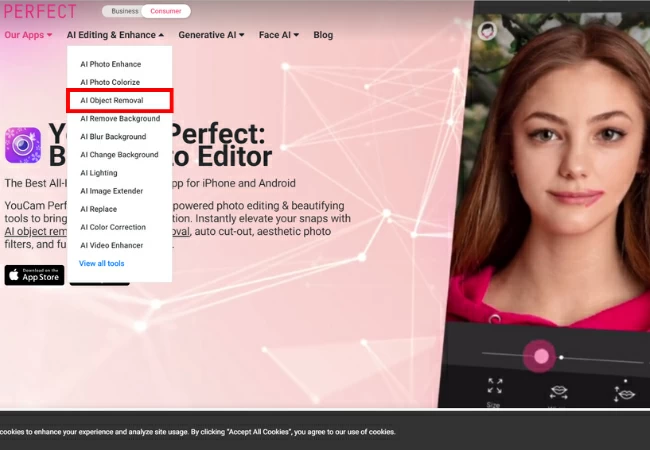
- Then choose and upload your image.

- Once uploaded, you can now adjust the size of your brush and glide it on the area of the double chin that you want to remove.
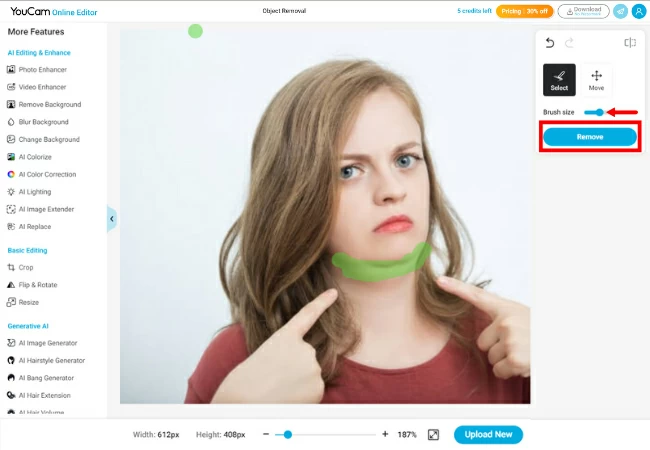
- To save, click the “Download” button on the upper right corner of your screen.
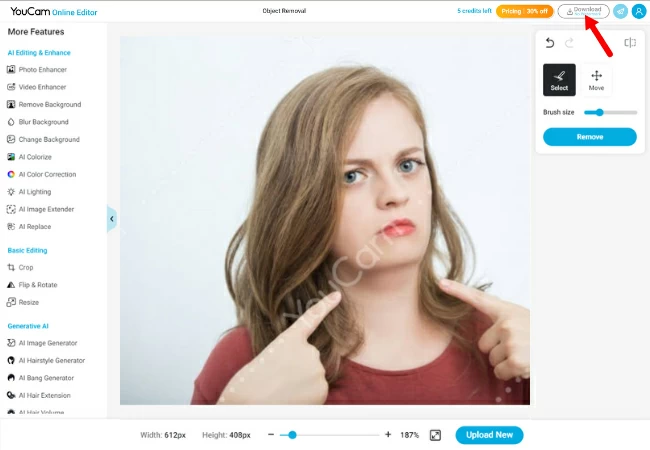
Picsart
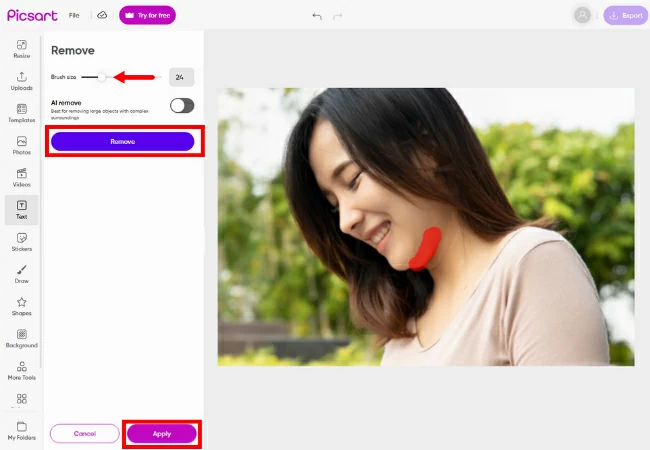
Anyone who wants to remove double chin from photo online free can do it with Picsart’s strong tools. You can remove distracting objects and enhance the chin area for a more sculpted appearance using its “Remove Objects” tool. Furthermore, it offers sophisticated editing features like blending and layering, which allow for a great degree of customization. Picsart is ideal for creative users since it gives you the freedom to make both delicate and striking edits to your images.
Here are the steps on how to remove double chin from Photo using Picsart:
- First, go to the Picsart website on your computer browser and select “Remove objects” to upload your image.
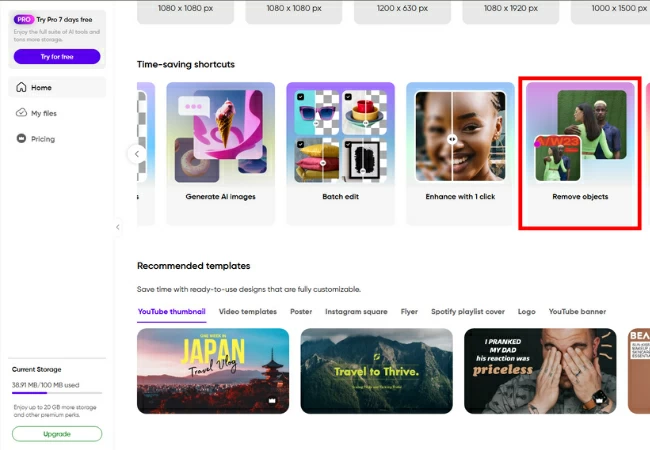
- Once your image is uploaded, you can now adjust the size of the brush and glide it on the area of the double chin. After that, click “Remove” then click “Apply”.
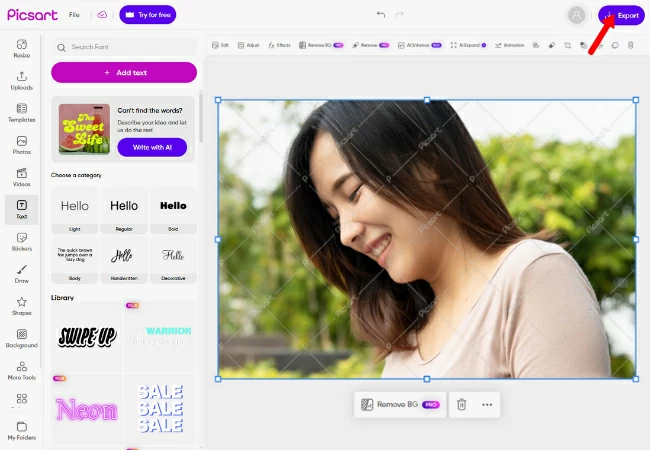
- Lastly, to save, click “Export”.
Comparison Table
| Feature | PicWish (AI Designer) | YouCam Perfect / Makeup | PicsArt |
| Editing method | Prompt-based | Slider | Slider |
| Processing speed | Fast | Instant | Fast with premium |
| Ease of use | Very simple | Extremely easy | Moderate |
| Control | You choose what to change via prompt | Limited, only slider intensity | High, manual warp lets you adjust precisely |
| Cost | Offers free version; Pro plan starts at $4.99/month | Offers free version; Premium plan starts at $5.99/month | Offers free version; Picsart plus is at $5/month, Picsart Pro starts at $7/month |
| Best for | Users who want AI-assisted edits for portraits, profile photos, or professional headshots with minimal effort | Casual selfies, social media photos, or quick edits on mobile | Creators who want full control for detailed edits, artistic adjustments, or advanced photo manipulationand profile pictures |
Tips to Avoid Double Chin on Photos
Before taking a picture, consider these tips to avoid the double chin effect:
- Adjust the Angle: Position the camera slightly above eye level to reduce shadows and create a slimming effect.
- Lighting Tips: Use soft, natural light if possible. Lighting from above can also help minimize the appearance of a double chin.
- Posture and Head Positioning: Maintain a straight back and elevate your neck a little. To tighten the skin around your jawline, try the “turtle pose,” which is moving your head forward a bit. These techniques can help enhance your appearance and make it easier to remove double chin from photo online free effectively.
- Choose Clothing Carefully: High-neck tops can push up the chin area, whereas V-neck or lower necklines can elongate the neck and draw attention away from the chin.
Conclusion
With the use of online tools, camera angle tips, and basic posture corrections, how to remove double chin from photo online free is now simpler than ever. These techniques will help you achieve a polished, confident look in any shot, whether you want to avoid a double chin in your next photo session or use editing software to remove it. Enjoy taking pictures without a double chin every time, and experiment to see what works best.


Leave a Comment