
What Makes Jewelry Photo Retouching Challenging?
Jewelry can be more difficult to retouch than many other products because of its reflective surfaces and intricate details. Gold, silver, gemstones, and polished metals can easily pick up reflections from the surroundings, while small imperfections become visible when the image is enlarged.
A good jewelry image retouching workflow should address several areas:
- Dust, fingerprints, and scratches
- Unwanted reflections and harsh highlights
- Uneven lighting and color
- Dull or unclear gemstones
- Distracting backgrounds
- Rough edges and tiny imperfections
At the same time, retouching should not make the jewelry look artificial. Removing every reflection or heavily smoothing the surface can make polished metal look flat and unrealistic.
How to Retouch Jewelry Photos for Professional Results
Professional jewellery photo retouching does not have to mean making hundreds of adjustments. A focused workflow can help you address the most noticeable problems while preserving the product’s authentic appearance.
1. Remove Dust, Scratches, and Other Imperfections
Start by cleaning up the image. Dust particles, fingerprints, tiny scratches, and smudges are especially noticeable on reflective jewelry.
In Photoshop, you can use tools such as the Healing Brush, Spot Healing Brush, or Clone Stamp to remove these imperfections. Zoom in to inspect the jewelry carefully, but check the image at normal viewing size as well. This helps prevent you from removing details that should remain.
For large batches of product images, AI retouching can speed up this part of the process. The important thing is to make sure the tool removes unwanted marks without damaging fine textures or gemstone details.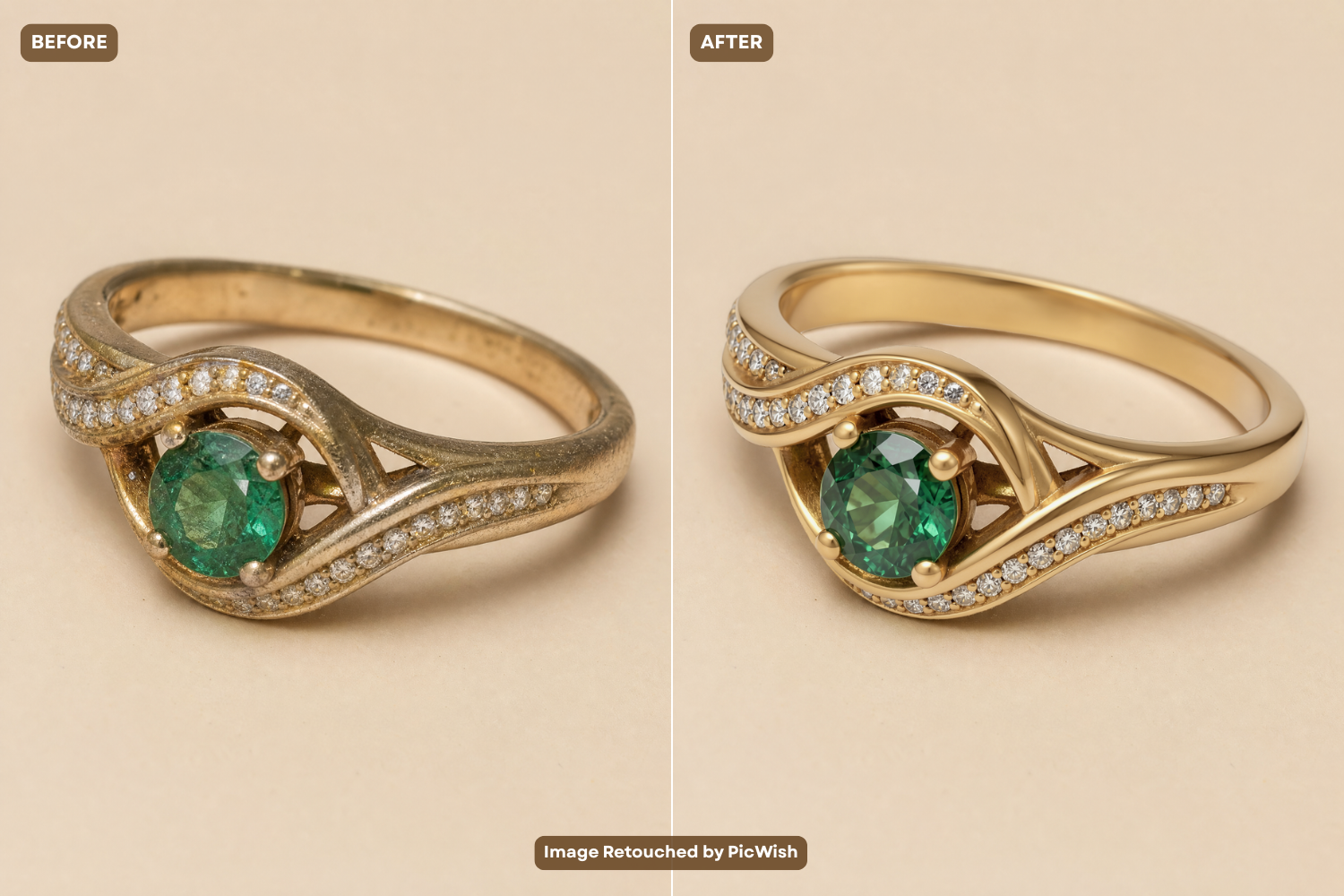
2. Correct Reflections, Lighting, and Metal Colors
Metal surfaces are one of the biggest challenges when retouching jewelry photos. A polished ring or necklace can reflect lights, cameras, surroundings, and even the photographer.
Rather than eliminating every reflection, identify the ones that distract from the jewelry. Reduce overly bright highlights and dark patches while keeping enough natural reflection to show that the surface is metallic.
You should also check the overall color and exposure. White gold and silver should not appear yellow, while yellow and rose gold should retain their characteristic tones.
Pay attention to:
- Highlights and shadows
- White balance
- Exposure
- Contrast
- Metal color
- Bright spots caused by reflections
The goal is a clean and balanced appearance, not a completely reflection-free surface.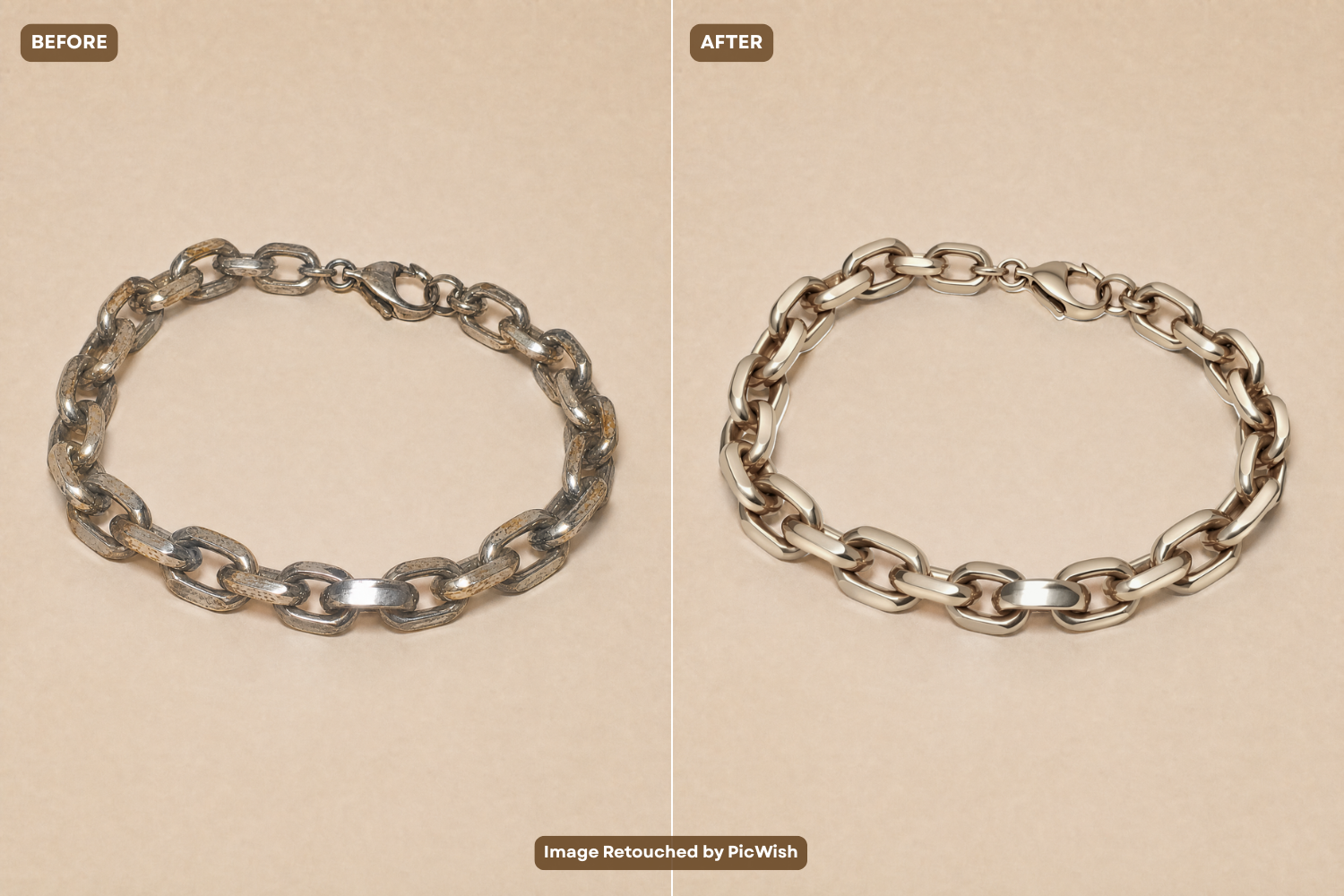
3. Enhance Gemstones and Fine Details
Gemstones need careful treatment because excessive editing can quickly make them look fake.
Instead of simply increasing saturation or sharpness, make selective adjustments that bring attention to the stone’s natural facets and color. Slightly improving contrast and clarity can make diamonds and other gemstones appear more defined without changing their character.
You can also refine small details around:
- Prongs
- Settings
- Stone edges
- Chain links
- Engraved details
When doing jewellery retouch, always compare the edited image with the original. The final result should still accurately represent the actual jewelry.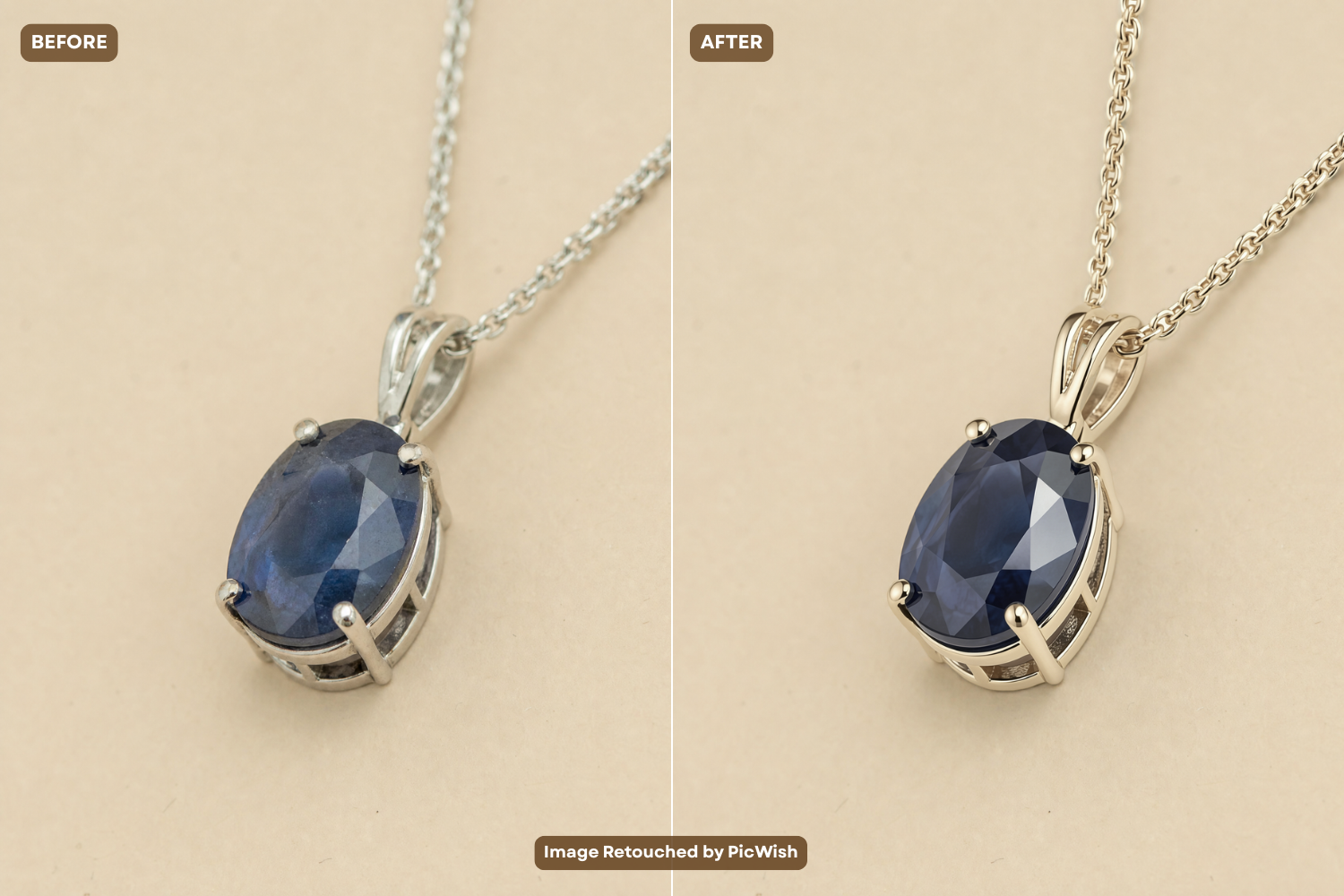
4. Clean Up the Background
A distracting background can take attention away from an otherwise beautiful jewelry photo.
For e-commerce images, a clean white or neutral background is often appropriate. Remove unwanted objects, marks, and uneven areas while keeping a natural shadow when it contributes to depth.
If the background is already clean, there is no reason to replace it simply for the sake of editing. Retouching should solve visual problems rather than introduce unnecessary changes.
5. Apply Final Color and Detail Corrections
Before exporting the image, take a step back and evaluate the entire photo.
Check whether:
- The jewelry is sharp enough
- Metal colors look accurate
- Gemstones remain natural
- Highlights are not blown out
- The background is clean
- Edges look refined
- The jewelry still matches the original product
This final check is particularly important for online stores because customers rely heavily on product images when deciding what to buy.
How to Retouch Different Types of Jewelry
Different jewelry pieces have different retouching challenges, so the same approach may not work for every product.
- Rings: Pay close attention to gemstones, prongs, metal reflections, and fingerprints around the band.
- Necklaces and chains: Check individual links and remove distracting marks without making the chain look unnaturally smooth.
- Earrings: If the image contains a pair, make sure both pieces have consistent brightness, color, and detail.
- Bracelets: Large metal surfaces can produce strong reflections, so focus on balancing highlights while preserving the material’s natural appearance.
The same principle applies to every piece: improve the photograph without changing what the customer will actually receive.
AI vs. Manual Jewelry Photo Retouching: Which Should You Use?
Traditional editing and AI retouching can both produce professional results, but they are useful in different situations.
Manual retouching gives you greater control over individual pixels, reflections, colors, and fine details. It can be the better option when working with high-value jewelry or images that require extensive customization.
AI retouching, on the other hand, can handle repetitive corrections much faster. This makes it particularly useful for jewelry sellers managing large product catalogs.
Use PicWish Product Retouch for Faster Jewelry Editing
PicWish Product Retouch offers a dedicated jewelry image retouching setting for refining jewelry product photos. It can help improve details, texture, and overall appearance while keeping the product’s key features intact.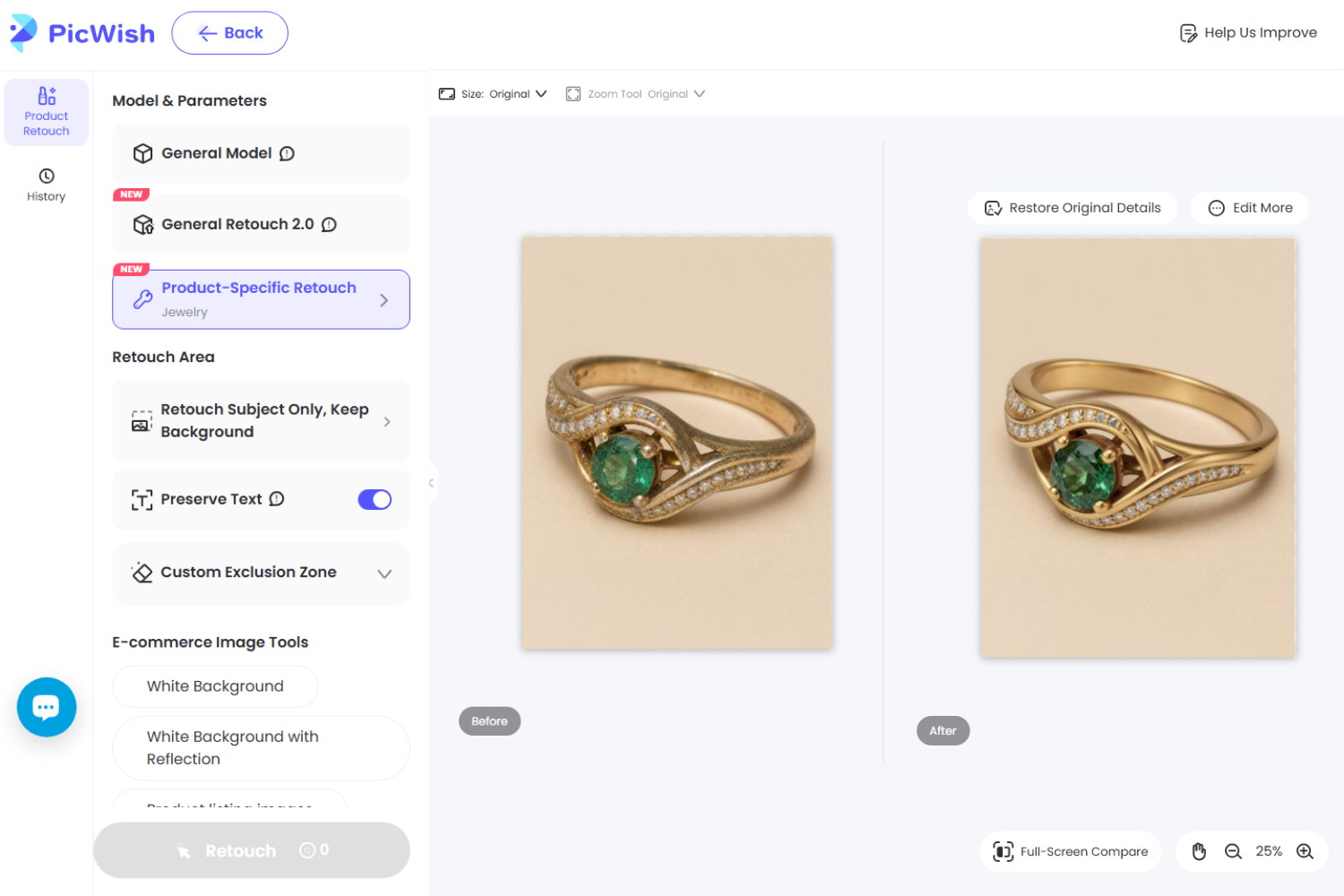
To retouch a jewelry photo:
- Open Product Retouch and upload your image.
- Select “Product-Specific Retouch” and choose “Jewelry.” The retouch settings will then be automatically optimized for jewelry photos.
- Set the Retouch Area to automatically limit the edits to the jewelry. You can enable Retouch Subject Only, Full Image Retouch, Retouch Subject Only Keep Background, or Preserve Text if your product contains text that should remain unchanged.
- Choose an e-commerce image option such as White Background or White Background with Reflection if you want to improve the product presentation.
- Click “Retouch” to generate the enhanced jewelry photo, then review the result before saving it.
How to Keep Retouched Jewelry Photos Consistent
If you sell several jewelry pieces, editing each photo individually is only part of the job. Your entire product catalog should also look consistent.
Keep these elements as uniform as possible:
- Metal colors
- Background colors
- Lighting
- Shadow intensity
- Image brightness
- Product positioning
- Level of sharpening
- Amount of gemstone enhancement
For example, if one gold ring appears warm and bright while another appears pale and gray, customers may perceive them as different products even when the metal is the same. Consistency is especially important for jewelry stores with large catalogs. Batch editing tools can make it easier to apply a similar retouching approach across multiple images.
Jewelry Photo Retouching Mistakes to Avoid
Even good jewelry image retouching techniques can produce poor results when taken too far. Avoid these common mistakes:
- Removing Every Reflection
Reflections are a natural characteristic of polished metal. Removing all of them can make jewelry appear flat or unrealistic.
- Over-Enhancing Gemstones
Too much saturation, sharpening, or brightness can make gemstones look artificial. Enhance their natural appearance instead.
- Smoothing Away Important Details
Jewelry often contains fine textures, engravings, prongs, and other small features. Excessive smoothing can erase these details.
- Changing the Product’s Actual Appearance
Retouching should not change the jewelry’s shape, stone color, metal type, or other characteristics that affect what the customer receives.
- Using Inconsistent Editing Styles
A product catalog looks less professional when every image has different lighting, backgrounds, colors, or levels of enhancement.
Conclusion
Good jewelry image retouching enhances product photos while keeping them natural. Manual editing offers precision, while PicWish Product Retouch speeds up repetitive work. The key is enhancing details without losing the jewelry’s authentic look.




Leave a Comment