
Quick Answer: How to Enhance Selfies with AI
To enhance selfies with AI, upload your selfie to an AI photo enhancer, let the tool automatically improve sharpness, clarity, lighting, and facial details, then preview the before-and-after result before downloading the improved image.
AI can help make blurry selfies clearer, improve low-resolution photos, sharpen facial features, brighten dark images, and make profile pictures look more polished. For a simple online workflow, PicWish is a practical option because it can enhance selfie quality without requiring manual editing skills.
Why Use AI to Enhance Selfies?
Selfies are often taken quickly, usually with a phone camera, front camera, or social media app. Because of that, they can easily look blurry, grainy, dark, or over-compressed.
AI photo enhancement is useful because it can automatically detect common image quality issues and improve them without complex editing. Instead of manually adjusting sharpness, brightness, texture, and resolution, you can let an AI tool analyze the photo and apply suitable improvements.
AI can be especially useful when you want to:
- Fix a blurry selfie
- Make your face look clearer
- Improve a low-resolution selfie
- Brighten a dark photo
- Sharpen facial details
- Enhance a profile picture
- Improve selfies for social media
- Restore clarity in old or compressed phone photos
The goal is not to completely change your face. A good AI selfie enhancer should make the photo clearer while keeping the result natural.
How to Enhance Selfies with AI Online
Here is a simple step-by-step method you can follow.
Step 1: Choose an AI Selfie Enhancer
Start by choosing an AI tool that can improve photo quality, sharpen details, and enhance faces naturally. Some tools focus heavily on beauty filters, while others focus more on image clarity.
For natural selfie enhancement, choose a tool that improves:
- Sharpness
- Resolution
- Facial clarity
- Lighting
- Overall image quality
PicWish is a good option if you want a simple online workflow. It helps improve selfie quality without requiring Photoshop or advanced editing skills.
Step 2: Upload Your Selfie
Upload the selfie you want to improve. For the best result, use the highest-quality version you have.
Avoid uploading screenshots of the selfie if you still have the original photo. Screenshots are usually more compressed and may lose detail. The original camera file often gives the AI more information to work with.
Step 3: Let AI Improve the Photo Quality
Once uploaded, the AI tool will analyze your selfie and enhance the image automatically.
Depending on the tool, it may improve:
- Face sharpness
- Eye and hair detail
- Skin clarity
- Overall brightness
- Image resolution
- Background clarity
- Noise or grain
This is useful when the selfie looks soft, slightly out of focus, or too low-quality for posting.
Step 4: Check the Before-and-After Result
Before downloading, compare the original selfie with the enhanced version. This step is important because over-enhancement can make selfies look unnatural.
Look carefully at:
- Skin texture
- Eye detail
- Hair edges
- Face shape
- Lighting
- Background quality
A good result should look clearer, not fake.
Step 5: Download the Enhanced Selfie
Once you are happy with the result, download the improved selfie. You can then use it for social media, profile pictures, resumes, online portfolios, dating profiles, business pages, or personal memories.
For important uses, such as a professional profile photo, choose the highest-quality export available.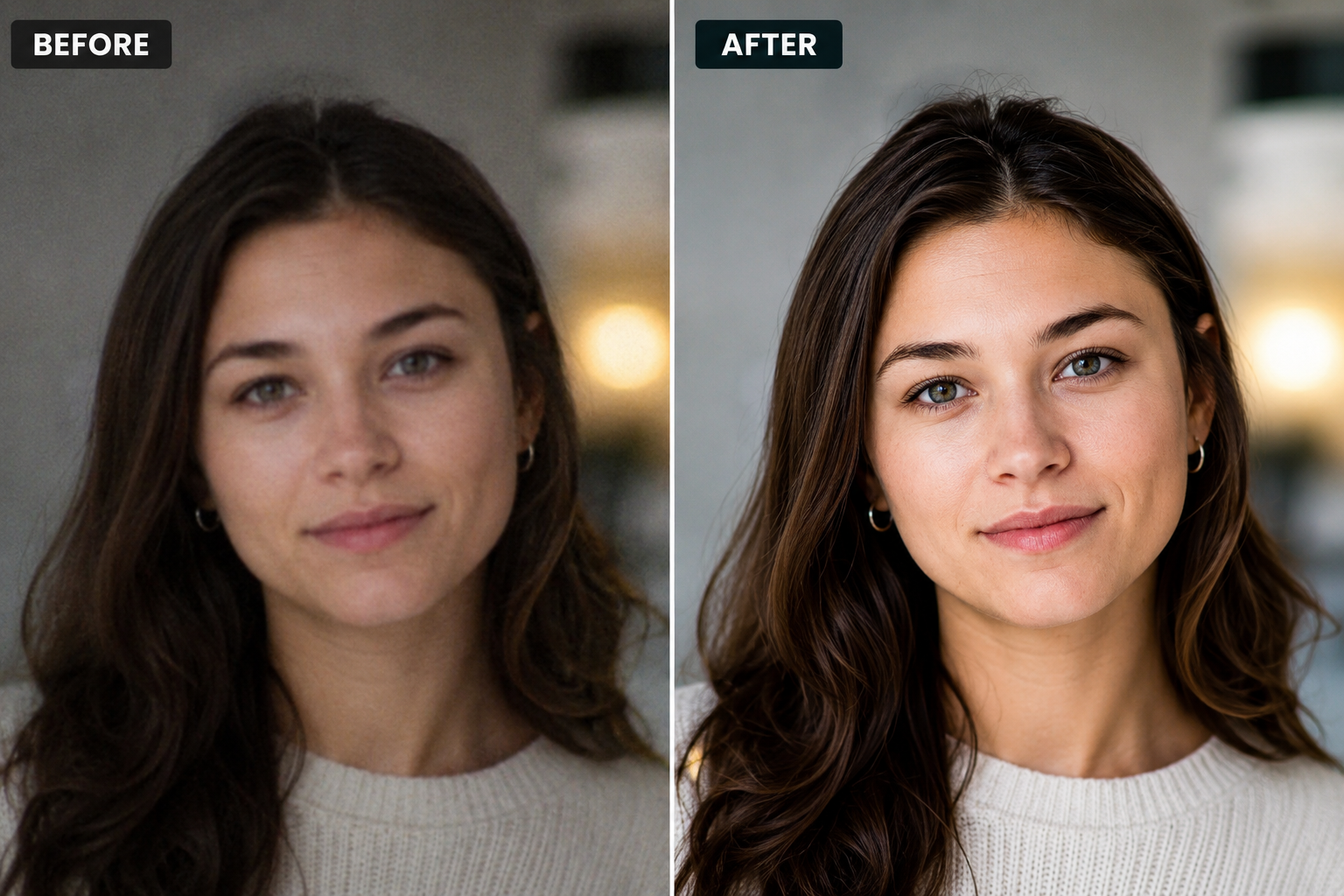
What Selfie Problems Can AI Fix?
AI selfie enhancement works best for common quality issues. Here are the main problems it can help with.
| Selfie problem | How AI can help |
|---|---|
| Blurry selfie | Sharpens facial details and improves clarity |
| Low-resolution selfie | Upscales the image for a clearer result |
| Dark selfie | Improves brightness and visibility |
| Soft face details | Enhances eyes, hair, and facial texture |
| Grainy selfie | Reduces noise and makes the image cleaner |
| Compressed social media photo | Restores some lost detail and sharpness |
| Old phone selfie | Improves clarity and overall quality |
| Dull-looking photo | Adds more contrast and visual polish |
AI cannot perfectly fix every photo. If the original selfie is extremely blurry, cropped too much, or very dark, the result may still have limitations. But for most everyday selfies, AI can make the image look much better.
Best Use Cases for AI Selfie Enhancement
AI selfie enhancement can be useful in many situations.
1️⃣Enhancing Selfies for Social Media
If your selfie looks slightly blurry or dull, AI can make it sharper and more polished before you post it on Instagram, Facebook, TikTok, Threads, or LinkedIn.
For social media, the best result is usually natural. Avoid making the photo too smooth or overly edited.
2️⃣Improving Profile Pictures
A profile picture should look clear, bright, and professional. AI can help improve facial clarity and image quality, especially if the original photo was taken with a front camera or cropped from a larger image.
This is useful for:
- LinkedIn profile photos
- Personal branding
- Online portfolios
- School or work profiles
- Business accounts
- Social media avatars
3️⃣Fixing Blurry Selfies
Blurry selfies are one of the most common problems. They can happen because of shaky hands, low light, poor focus, or front camera limitations.
An AI photo enhancer can sharpen the image and make facial features easier to see.
4️⃣Enhancing Low-Resolution Selfies
Some selfies look pixelated because they were downloaded from social media, sent through messaging apps, or taken with an older phone.
AI upscaling can increase the resolution and make the image look cleaner.
5️⃣Improving Old Selfies
Old selfies from previous phones may look soft, small, or faded. AI can help improve clarity and make them more usable for sharing, printing, or saving.
6️⃣Making Selfies Look More Natural and Clear
Not everyone wants beauty filters. Sometimes, you just want the photo to look cleaner while still looking like you.
For this use case, choose an AI enhancer that focuses on clarity and image quality instead of heavy face reshaping or makeup effects.
AI Selfie Enhancer vs Beauty Filter: What’s the Difference?
An AI selfie enhancer and a beauty filter are not exactly the same.
| Feature | AI selfie enhancer | Beauty filter |
|---|---|---|
| Main goal | Improve image quality | Change appearance |
| Focus | Clarity, sharpness, resolution | Skin smoothing, makeup, face effects |
| Best for | Blurry or low-quality selfies | Stylized social media looks |
| Result | More natural if used correctly | Can look artificial if overused |
| Use case | Profile photos, clear selfies, old photos | Fun edits, beauty apps, casual posts |
If your goal is to improve selfie quality, use an AI photo enhancer. If your goal is to change your look creatively, a beauty filter may be more suitable.
For PicWish, the better angle is natural enhancement: clearer image, better details, improved sharpness, and better resolution.
How to Get Natural Results When Enhancing Selfies
AI tools can improve selfies quickly, but the best results come from using them carefully.
Here are some tips:
- Use the original photo whenever possible
- Avoid enhancing the same selfie too many times
- Do not over-sharpen facial details
- Keep skin texture natural
- Compare the before and after result
- Avoid tools that change your face shape too much
- Use good lighting when taking the original selfie
- Crop the photo after enhancement, not before
- Choose high-quality export for profile photos
A natural selfie should look clearer and brighter, but still realistic.
Common Mistakes to Avoid
When using AI to enhance selfies, avoid these common mistakes.
❌ Over-smoothing the Face
Too much smoothing can make the image look fake. It may remove natural skin texture and make the photo look less realistic.
❌ Over-sharpening Details
Sharpness can improve clarity, but too much sharpening can create harsh edges, especially around the eyes, hair, and mouth.
❌ Using a Low-Quality Screenshot
A screenshot usually has less detail than the original photo. Upload the original selfie whenever possible.
❌ Ignoring Lighting
AI can improve brightness, but it cannot fully replace good lighting. A selfie taken in better light will usually enhance better.
❌ Choosing the Wrong Tool
Some tools are better for beauty effects, while others are better for photo quality improvement. Choose based on your goal.
Best Tool to Enhance Selfies with AI Online
If you want a simple way to enhance selfies online, PicWish is a practical choice. It is designed for users who want to improve photo quality without learning complicated editing software.
With PicWish, you can enhance selfie clarity, sharpen details, and improve overall image quality in a simple workflow. This makes it useful for everyday users, creators, students, professionals, and anyone who wants a clearer profile picture or social media photo.
PicWish is especially useful if you want to:
- Make a blurry selfie clearer
- Improve a low-resolution selfie
- Enhance profile pictures
- Sharpen facial details naturally
- Improve old or compressed phone photos
- Enhance selfies online without Photoshop
It may not offer the same level of manual control as professional desktop editing software, but for quick and natural selfie enhancement, it is an easy starting point.
How to Enhance Selfies with PicWish
Here is a simple workflow you can use:
- Open PicWish Photo Enhancer.
- Upload your selfie.
- Let the AI automatically enhance the photo.
- Preview the before-and-after result.
- Download the clearer selfie.
![picwish selfie photo enhancer]()
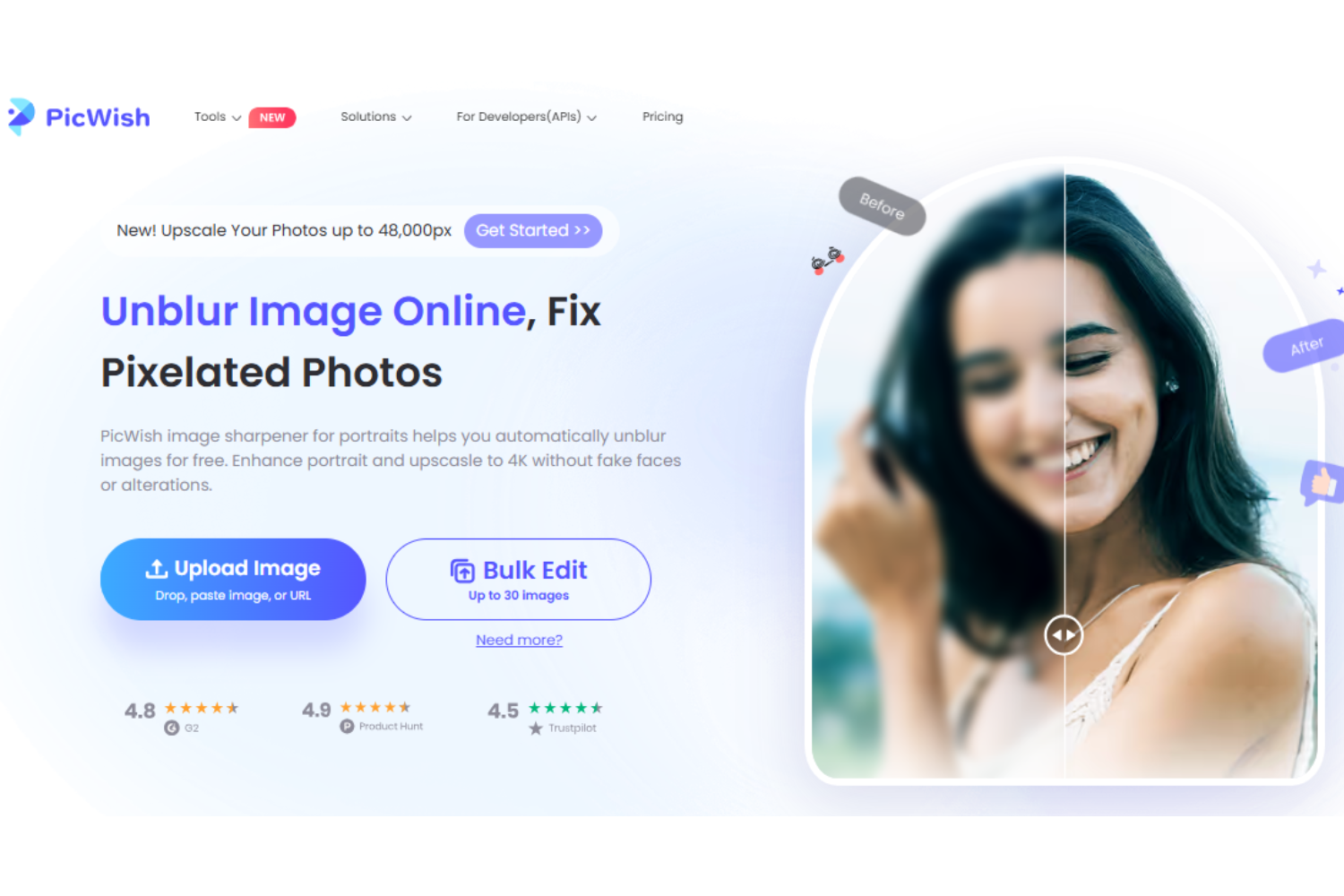
This workflow is useful if you want to improve selfie quality quickly without adjusting settings manually.
Before and After: What Should Change?
A good AI-enhanced selfie should show clear improvements without looking unnatural.
Here is what you should expect:
| Before | After |
|---|---|
| Face looks soft or blurry | Facial details look clearer |
| Eyes are not sharp | Eyes look more defined |
| Hair looks flat or unclear | Hair texture becomes more visible |
| Image looks low-resolution | Photo looks cleaner and larger |
| Lighting looks dull | Brightness and contrast improve |
| Photo looks compressed | Details become easier to see |
The best result is one where people notice that the photo looks better, but not overly edited.
When Should You Use an AI Selfie Enhancer?
You should use an AI selfie enhancer when your photo has good composition but poor quality.
For example:
- The pose is good, but the photo is blurry
- Your face looks soft because of low light
- The selfie is too small or low-resolution
- The photo was compressed by a messaging app
- You want a clearer profile picture
- You want to improve a selfie before posting it
- You want to restore an old phone selfie
If the photo has bad framing, closed eyes, strong motion blur, or a face hidden by objects, AI enhancement may not fully solve the problem.
Final Thoughts
Learning how to enhance selfies with AI is useful if you often take photos with your phone and want clearer, sharper, more polished results. AI tools can help fix blurry selfies, improve low-resolution images, brighten dull photos, and make profile pictures look better in just a few clicks. If you want to compare more options before choosing a tool, check out our guide to the best AI photo enhancer tools in 2026.
For most users, the best approach is to choose a tool that improves photo quality naturally instead of applying heavy beauty filters. PicWish is a practical option because it offers a simple online workflow for enhancing selfies, portraits, old photos, and everyday images.
Whether you want to fix a blurry selfie, improve a profile picture, or make your photo look clearer before posting it, AI selfie enhancement can help you get a better result quickly and easily.
FAQ
❓How can I enhance selfies with AI?
You can enhance selfies with AI by uploading your photo to an AI photo enhancer, letting the tool automatically improve clarity, sharpness, lighting, and resolution, then downloading the improved image. Tools like PicWish make this process simple and beginner-friendly.
❓What is the best AI tool to enhance selfies?
The best AI tool depends on your goal. PicWish is a good choice for natural selfie enhancement and overall photo quality improvement. Remini is popular for face-focused enhancement, while other tools may focus more on beauty filters or creative effects.
❓Can AI improve selfie quality without changing my face?
Yes. Some AI tools focus on improving image quality rather than changing your appearance. PicWish, for example, is useful for enhancing clarity, sharpness, and resolution while keeping the result natural.
❓What is the difference between an AI selfie enhancer and a beauty app?
An AI selfie enhancer improves photo quality, such as clarity, sharpness, resolution, and lighting. A beauty app usually focuses more on changing appearance, smoothing skin, adding makeup effects, or reshaping facial features.
❓Can I enhance selfies for free?
Yes, some AI photo enhancer tools offer free or limited free use. Free options are useful for testing or occasional edits, but high-resolution downloads, batch processing, or advanced features may require a paid plan.
❓Does AI selfie enhancement work on old selfies?
Yes. AI can improve old selfies by sharpening details, increasing resolution, and making the image look cleaner. It works best when the original photo still has visible facial details.
❓Can AI make a low-resolution selfie high quality?
AI can upscale a low-resolution selfie and improve its clarity, but the final quality depends on the original image. If the photo is too small or heavily compressed, AI can improve it, but it may not fully recreate all lost details.
❓Is AI selfie enhancement safe for professional photos?
AI selfie enhancement can be useful for professional profile photos if the result stays natural. Avoid over-smoothing, heavy filters, or unrealistic edits, especially for LinkedIn, resumes, business profiles, or portfolio images.
❓What should I avoid when enhancing selfies with AI?
Avoid over-smoothing the face, over-sharpening details, uploading low-quality screenshots, using too many filters, or changing your appearance too much. The best enhanced selfie should look clear, natural, and realistic.




Leave a Comment