

Quick Answer
Product listing images are photos or visuals used to showcase products on ecommerce platforms. With AI, you can turn one original product photo into multiple listing images with different scenes, backgrounds, and compositions. Tools like PicWish Product Listing Images can help create a consistent series of ecommerce visuals from a single product reference, making it easier to build a complete product gallery without starting from scratch for every image.
What Are Product Listing Images?
Product listing images are photos or visuals used to showcase products on ecommerce platforms, online stores, and product pages. They help shoppers understand what a product looks like, how it can be used, and what makes it worth buying.
A product listing may include several types of images, such as a clean main product photo, lifestyle scene, close-up, detail shot, or promotional visual. Using different images gives shoppers more information and creates a more engaging product page.
Good product listing images should:
- Clearly show the product
- Keep the product’s appearance accurate
- Use a clean and appropriate composition
- Highlight important features
- Match the store’s visual style
- Help customers understand the product at a glance
Why Are Product Listing Images Important?
Help Customers Understand the Product
Online shoppers cannot physically examine a product before purchasing. Multiple product images give them different views and help them understand its appearance, size, details, and use.
Make Products More Attractive
A well-designed product image can immediately catch a shopper’s attention. Lifestyle scenes and carefully selected backgrounds can also make products look more appealing without distracting from the main subject.
Build Trust With Shoppers
Clear, accurate visuals can make a product listing look more professional. Showing the actual product from different perspectives also gives customers more information before they decide to buy.
Create a More Consistent Storefront
Using a similar visual style across product listings can make an online store look more organized and professional. Consistent backgrounds, lighting, and compositions can also strengthen brand identity.
Reduce the Need for Repeated Photoshoots
Creating several images for every product traditionally requires additional photography, props, locations, and editing. AI can provide another option by generating different product scenes from an existing product photo.
What Types of Product Listing Images Do You Need?
Different images can serve different purposes within the same product listing.
| Image Type | Purpose |
| Main product image | Clearly presents the product |
| Lifestyle image | Shows the product in a realistic setting |
| Detail image | Highlights materials, features, or design |
| Different scene | Gives shoppers additional visual context |
| Promotional image | Communicates product benefits or marketing messages |
| Size or feature image | Helps explain specifications or important details |
Instead of repeating nearly identical photos, sellers can use each image to answer a different question a potential customer may have.
How to Create Product Listing Images With PicWish
PicWish Product Listing Images lets you upload product photos once and generate different types of ecommerce visuals from them. You can provide product information, select your marketplace and image preferences, then choose the image types you want to generate.
1. Open PicWish AI Designer and Select Product Listing Images
Go to PicWish AI Designer, then click Product Listing Images to access the product listing image generator.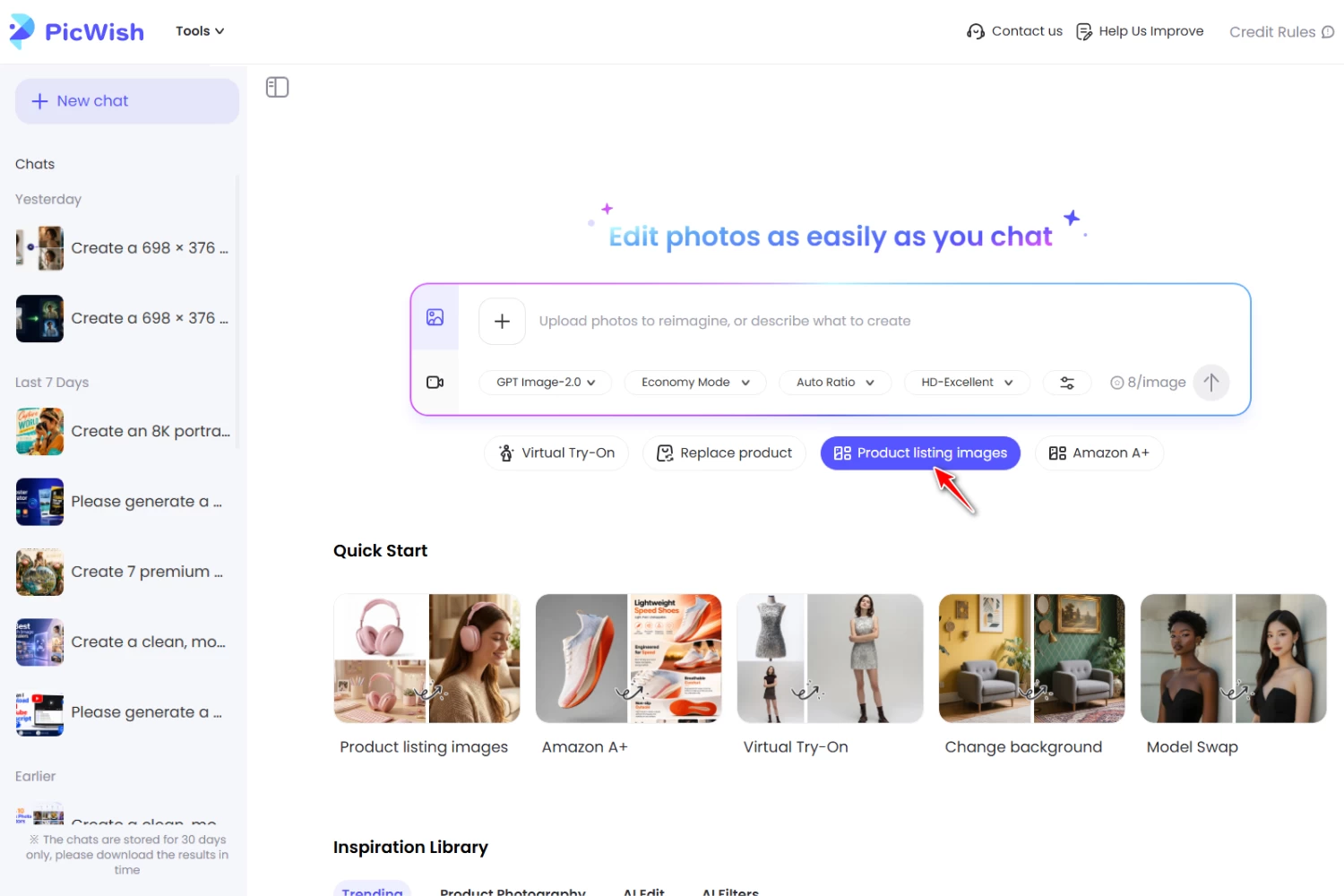
2. Upload Your Product Photo
Click Upload image(s) to add the product photos you want to use. PicWish allows up to five images per product, so you can provide multiple references when needed. For the best results, use clear, high-quality photos where the product and its important details are easy to see.
3. Add Your Product Information
Enter relevant details in the Product Info field, such as the product name, key selling points, target audience, desired scenarios, and specifications.
If you don’t have the information ready, you can also use AI Copywriter to generate the selling points automatically.
4. Set Your Generation Preferences
Under Generation Settings, choose the marketplace, region, language, aspect ratio, AI model, and image resolution for your product listing images.
These settings help tailor the generated visuals to your intended ecommerce platform and target audience.
5. Choose the Product Listing Image Types
Select the image types you want to include in your product listing. PicWish offers options such as:
- Main Image (Studio White)
- Infographic
- Feature Highlight
- Detail Close-up
- Lifestyle
- Multi-scene Collage
- Size & Specifications
- Competitor Comparison
- Usage Comparison
 You can select multiple image types to create a more complete product gallery. Choose the ones that best showcase your product and provide useful information to shoppers.
6. Generate Your Product Listing Images
After selecting your image types and settings, click Generate. PicWish will create the selected product listing images based on your uploaded product references and the information you provided.
Review the generated visuals to make sure the product’s appearance, details, and presentation accurately reflect the actual item.
7. Review and Use Your Images
Choose and save the generated images that best fit your product listing. You can use different image types for different purposes, such as presenting the product clearly in the main image, highlighting key features, showing it in a lifestyle setting, or displaying its specifications.
This gives you a complete set of product listing images from a single upload workflow instead of creating each visual separately.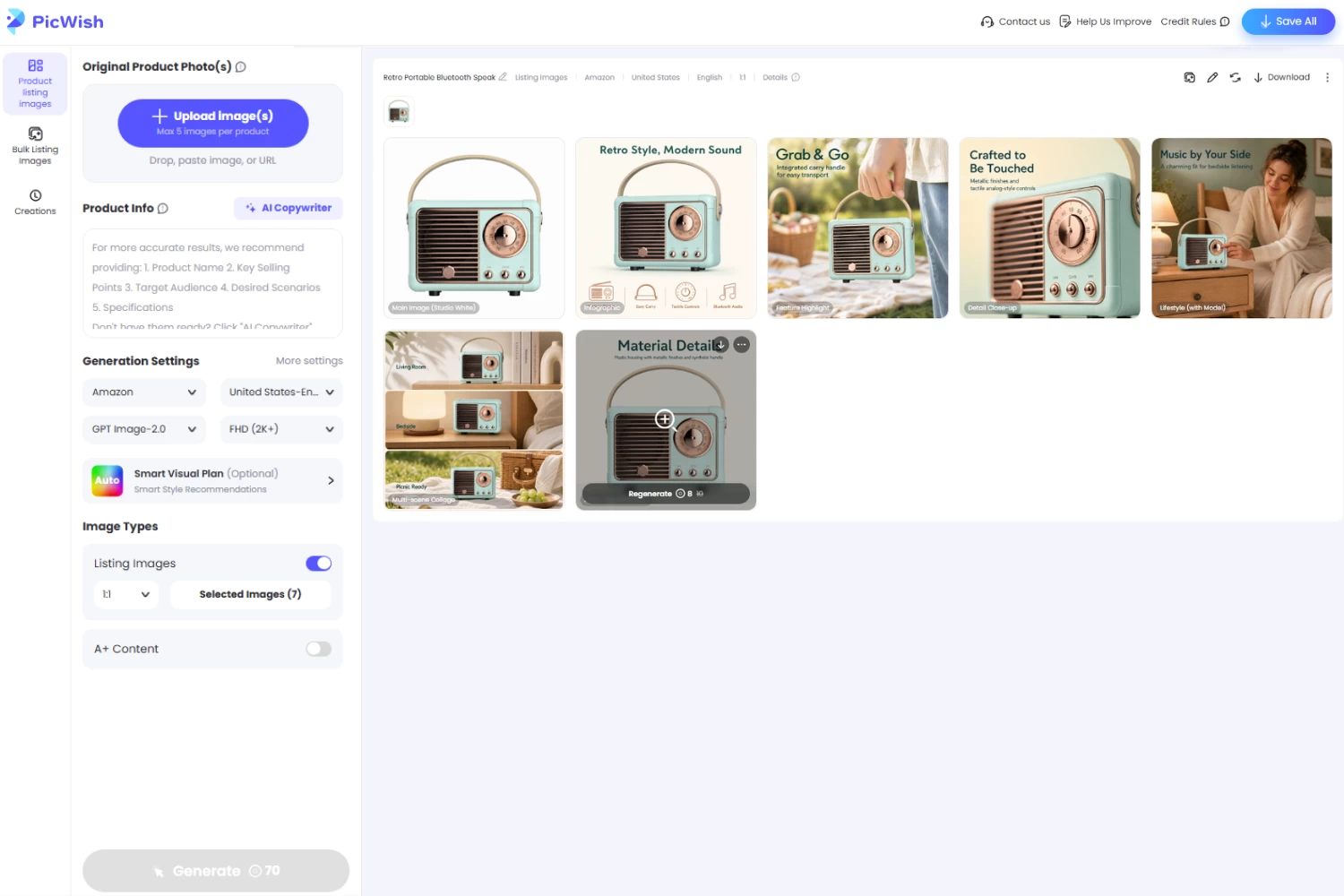
How to Make Better Product Listing Images With AI
Creating more product listing images does not automatically make a product listing better. Each image should have a clear purpose, accurately represent the product, and help shoppers understand what they are buying.
Use a Clear Product Reference
Start with a sharp, well-lit product photo. Avoid using an image where the product is heavily cropped, obscured, or difficult to distinguish from the background.
Keep the Product Consistent
The product should remain recognizable across every generated image. Avoid scenes that introduce unnecessary changes to its shape, color, packaging, or other important details.
Match the Background to the Product
Choose environments that make sense for the product. A minimalist background may work well for premium cosmetics, while a kitchen setting may be more suitable for cookware. The background should provide context without taking attention away from the product.
Show the Product in Context
Lifestyle images can help shoppers imagine how they might use a product. A contextual scene can communicate more than a simple isolated product photo. However, the setting should remain believable and relevant to the product.
Give Each Image a Purpose
Instead of generating several images that look almost identical, use different visuals to communicate different information. For example, one image can focus on the overall product, another can show it in use, and another can highlight an important feature.
Avoid Overly Complicated Scenes
Too many props, colors, or visual elements can make a product difficult to see. Keep the composition focused so the product remains the visual priority.
Common Mistakes to Avoid When Creating Product Listing Images
Creating multiple product listing images can make an ecommerce page more informative, but poorly generated visuals may confuse shoppers or misrepresent the product. Keep these common mistakes in mind when creating and reviewing your images.
Changing the Actual Product
An AI-generated image should not make a product look different from the item customers will receive. Always check important details after generation.
Using Distracting Backgrounds
A visually impressive background is not useful if it overwhelms the product. Keep the setting relevant and make sure the product remains easy to identify.
Creating Unrealistic Shadows
Lighting and shadows should make sense within the scene. Inconsistent shadows can make an AI-generated product image look unnatural.
Making Products Look Disproportionate
Pay attention to the product’s size relative to its surroundings. An unrealistic scale can make an otherwise attractive image less believable.
Adding Inaccurate Features
AI can sometimes introduce details that are not present on the original product. Review generated images carefully and remove or replace visuals that misrepresent the product.
Using Inconsistent Visual Styles
If every product listing uses completely different lighting, backgrounds, and compositions, the storefront can look disorganized. Establish a visual direction and maintain it across your images.
Creating Too Many Images Without a Purpose
More images are not always better. Focus on creating a useful selection that answers customers’ questions and presents the product from different perspectives.
FAQs
📍 How many product listing images should a product have?
The ideal number depends on the product and the ecommerce platform. A useful product gallery should include enough images to show the product clearly, highlight important details, and demonstrate relevant use cases without adding repetitive visuals.
📍 What should the first product listing image show?
The first image should clearly show the product and make it easy for shoppers to identify what is being sold. A clean composition with minimal distractions is usually a strong starting point.
📍 Can AI create product listing images from one photo?
Yes. AI tools can use an original product photo as a reference and generate additional visuals with different backgrounds, environments, and compositions. This can help sellers create multiple listing images without arranging a separate photoshoot for every scene.
📍 What background is best for product listing images?
The best background depends on the product and the purpose of the image. A simple background works well for clearly presenting the product, while a relevant lifestyle setting can provide context and demonstrate how the product fits into everyday use.
📍 Can AI-generated product images be used for ecommerce?
AI-generated images can be useful for ecommerce as long as they accurately represent the product and comply with the requirements of the marketplace or platform where they will be published. Always review AI-generated visuals for inaccurate details before using them commercially.
Conclusion
Creating effective product listing images does not always require a new photoshoot for every scene. With AI, sellers can turn a single product photo into multiple visuals that showcase the product in different settings and compositions. PicWish makes it easier to create these variations while keeping the featured product consistent.




Leave a Comment