

Quick Answer
To maintain product consistency in AI-generated images, start with a clear product reference and specify the details that must remain unchanged, such as the shape, color, logo, and packaging. PicWish AI Designer can use an original product image with prompts or ready-made templates to create new product scenes, making it easier to produce consistent visuals for ecommerce and marketing.
What Is Product Consistency in AI-Generated Images?
Product consistency means keeping a product’s recognizable characteristics unchanged when creating multiple images with AI. Instead of generating a slightly different version of the product each time, the goal is to preserve its identity while changing elements such as the background, setting, lighting, or composition.
For example, an ecommerce brand may want to show the same handbag in a studio product photo, a lifestyle scene, and a social media advertisement. The settings can be completely different, but the handbag should still have the same color, shape, material, logo, and design.
Maintaining this consistency is especially important when AI is used to create multiple product visuals from a single reference image.
Why Is Product Consistency Important for Ecommerce?
Consistent product images help customers recognize the same item across different channels. They also make an online store look more professional and help prevent confusion about what customers will actually receive.
Product consistency is particularly important for:
- Product listings: Customers should see the same product across the main image and supporting visuals.
- Advertising: Ads should accurately represent the product being promoted.
- Social media: Different posts can use different creative styles without changing the product itself.
- Brand campaigns: Multiple visuals should maintain the same product identity and branding.
- Customer trust: Accurate and consistent images help set realistic expectations.
In short, product consistency keeps the product fixed while allowing the creative environment around it to change.
Why Does AI Change Products in Generated Images?
AI image generators don’t always preserve every detail of a reference product. When generating a new image, the AI may reinterpret parts of the product based on the prompt, surrounding scene, or visual information it has available.
Several factors can contribute to these changes.
Vague or Incomplete Prompts
A prompt that simply says “put this product in a luxury setting” may not provide enough information about which characteristics need to remain unchanged.
The AI may preserve the general appearance of the product but alter smaller details.
Instead of relying on a vague instruction, identify the important characteristics that should remain fixed.
For example:
Keep the original product shape, color, material, logo placement, and packaging unchanged. Change only the background and lighting.
Poor-Quality Reference Images
A reference image gives the AI visual information about the product. If the product is blurry, poorly lit, partially hidden, or too small in the image, some of its details may be difficult to reproduce accurately.
A clear reference image makes it easier to identify distinctive characteristics such as:
- Product shape
- Color
- Texture
- Logo
- Packaging
- Buttons or other components
- Unique design elements
Too Many Changes at Once
AI can struggle when a prompt asks it to make many major changes simultaneously.
For example, asking AI to change the product’s color, shape, material, background, camera angle, lighting, and environment gives it many opportunities to reinterpret the original product. If consistency is the priority, focus on changing the scene rather than redesigning the product.
Small Product Details Can Change
Even when the overall product looks correct, smaller details may change.
Common examples include:
- Logos
- Labels
- Text
- Colors
- Patterns
- Packaging
- Product proportions
- Small product features
These details can be particularly important for branded products. A slightly different logo or package design can make an otherwise convincing AI image inaccurate.
How to Keep Products Consistent in AI-Generated Images
The easiest way to think about product consistency is to divide the image into two parts:
- What should stay the same: the product itself.
- What can change: the scene surrounding the product.
Follow these steps to maintain that distinction:
1. Start With a Clear Product Reference Image
Use a clear image that shows the product as accurately as possible.
Ideally, the product should be:
- Fully visible
- Well lit
- In focus
- Easy to distinguish from the background
- Free from unnecessary obstructions
If the product has important details, make sure they are visible in the reference image. For example, a skincare bottle with a distinctive label should have a reference image where the bottle and label are clearly visible.
2. Identify the Product Details That Must Stay the Same
A useful approach is to clearly distinguish the elements you want to preserve from those you want to modify.
Keep unchanged:
- Product shape
- Product color
- Materials
- Logo
- Packaging
- Key features
Change:
- Background
- Environment
- Lighting
- Props
- Composition
- Overall setting
For example, you could use the same product while changing the setting from a plain studio background to a bathroom countertop or a summer lifestyle scene.
The goal is to make the environment flexible while keeping the product fixed.
3. Avoid Unnecessary Product Modifications
If consistency is your goal, avoid asking AI to redesign the product at the same time you change the scene.
For example, instead of:
Make this bottle blue, change its shape, redesign the label, and place it in a luxury bathroom.
try:
Keep the original bottle shape, color, label, and design unchanged. Place the product on a marble bathroom counter with soft natural lighting.
The second prompt gives the AI fewer opportunities to reinterpret the product.
4. Use the Same Product Reference Across Different Scenes
Once you have a good product reference, use it consistently when creating new visuals.
For example, the same pair of shoes could appear in:
- A clean ecommerce product photo
- A lifestyle scene
- A seasonal campaign
- A social media post
- An advertisement
The background and composition can change while the shoes remain recognizable. This makes it easier to build a collection of marketing visuals without starting with a completely different product representation each time.
5. Compare Every Result With the Original Product
Don’t judge an AI-generated image only by whether it looks attractive. Compare it with the original product.
Check:
- Shape: Does the product have the same form?
- Proportions: Are its dimensions still accurate?
- Color: Is the color unchanged?
- Material: Does the surface still look correct?
- Logo: Is the branding accurate?
- Packaging: Does the packaging match?
- Labels: Are important text and labels preserved?
- Features: Are distinctive product details still present?
If something important has changed, the image may not be suitable for commercial use even if the overall image looks polished.
6. Regenerate When Important Details Change
AI-generated images don’t always get everything right on the first attempt. If an important product characteristic changes, refine the prompt or adjust the generation instead of simply accepting the result.
A practical workflow is:
Generate → Compare → Identify changes → Refine → Generate again → Review
This is especially useful when producing multiple images for the same product.
How to Write Prompts for Consistent AI Product Images
A well-structured prompt can make it easier to communicate which parts of the image should stay the same and which parts can change.
Describe the Product Clearly
Start by identifying the product and its important characteristics.
For example:
A white ceramic skincare bottle with a rounded body, gold cap, and minimalist black label.
Then describe the desired environment:
Place the product on a bright marble bathroom counter with soft natural lighting.
Specify What Must Not Change
Include a clear instruction about the product details that should remain unchanged.
For example:
Keep the original product shape, color, material, logo, label placement, and proportions unchanged.
This makes your priority clear.
Describe Only the Changes You Want
Be specific about what you want AI to modify.
For example:
Change the background to a warm, minimalist bathroom setting while keeping the original product unchanged.
This is more useful than simply asking AI to “make the image better.”
Use a Consistent Prompt Structure
A simple structure you can reuse is:
Product description + fixed details + desired scene + lighting/style + elements that must remain unchanged
For example:
A white ceramic skincare bottle with a rounded body and gold cap, preserving its original shape, color, logo, label, and proportions. Place it on a marble bathroom counter with warm natural lighting and a clean luxury aesthetic. Change only the environment and composition.
This approach can help you create different scenes while keeping the product’s core identity consistent.
Example Prompt for Product Consistency
Here’s a reusable example:
Use the uploaded product as the exact visual reference. Keep its shape, proportions, color, material, logo, packaging, and distinctive details unchanged. Place the product in a bright luxury bathroom with marble surfaces, soft natural lighting, and minimal styling. Change only the environment, lighting, and composition while preserving the original product identity.
For another campaign, you could change only the scene:
Use the same product reference and preserve all product details. Place the product in a warm summer outdoor setting with natural sunlight and subtle botanical elements. Do not alter the product’s shape, color, packaging, logo, or proportions.
How to Create Consistent Product Images With PicWish AI Designer
PicWish AI Designer can help turn one product reference into different product visuals without starting from scratch each time. You can upload an original product photo, describe the desired scene with a prompt, or choose a pre-tuned template and adjust it to your needs. PicWish also offers AI models designed for high-consistency product photography.
1. Upload Your Original Product Image
Start with a clear product photo that shows the item and its important details. The reference should make the product’s shape, color, packaging, logo, and other distinctive features easy to identify.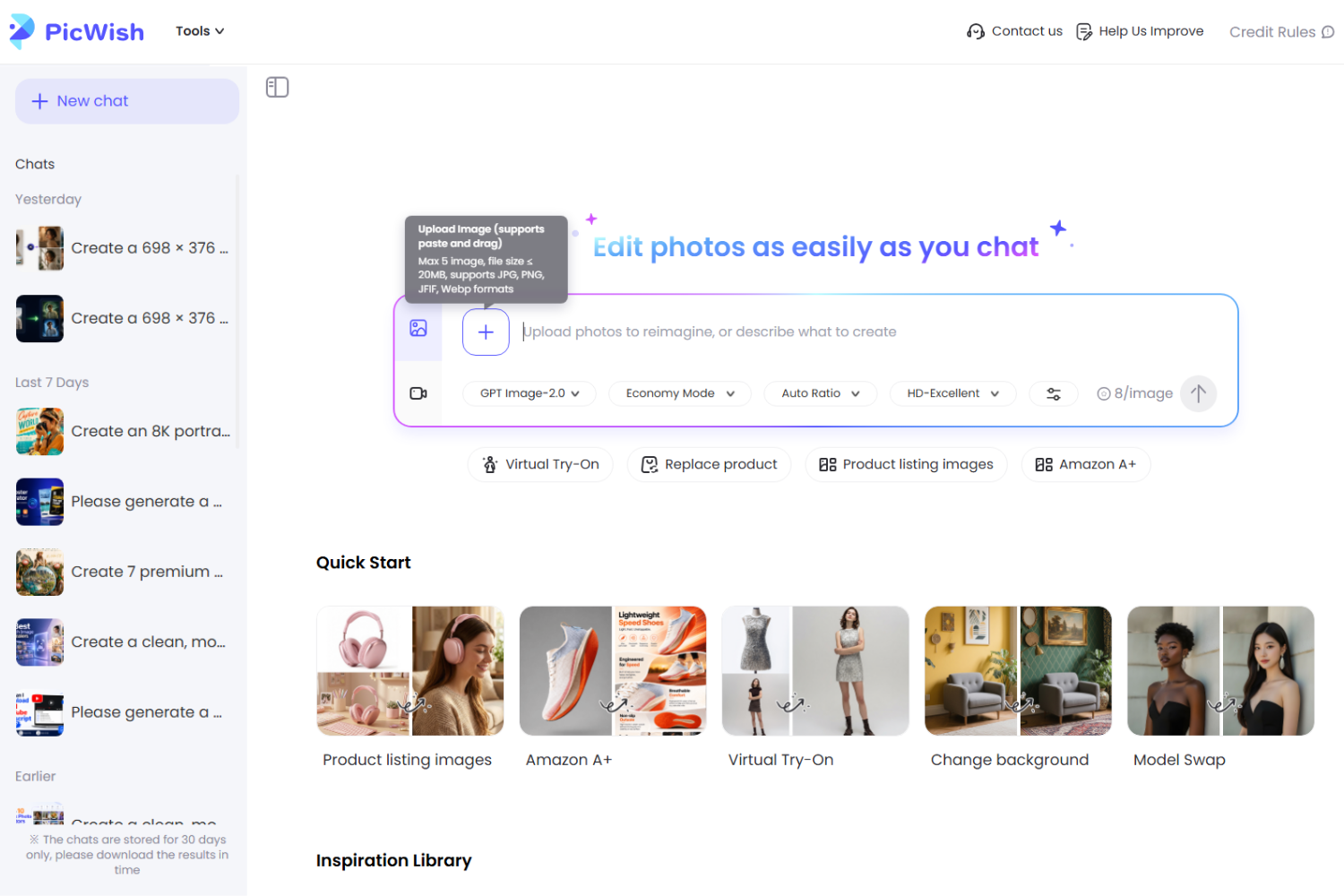
If you already have an uploaded image or a generated result that you want to build on, use the Use as Reference button to make that image the visual reference for a new or more polished prompt.
2. Describe the Scene and Product Details
Use a prompt to tell PicWish how you want the product to appear in its new environment while clearly stating which product characteristics should remain unchanged.
For example:
Place this skincare bottle on a bright marble bathroom counter with soft natural lighting and minimal luxury decor. Preserve the original bottle’s shape, proportions, color, gold cap, logo, label, and material. Change only the environment and composition.
 This keeps the workflow aligned with the main principle of product consistency: change the scene without unnecessarily changing the product.
You can also choose from PicWish’s pre-tuned product photography templates instead of writing a prompt from scratch. These templates are designed for scenarios such as lifestyle product images and Amazon listing images.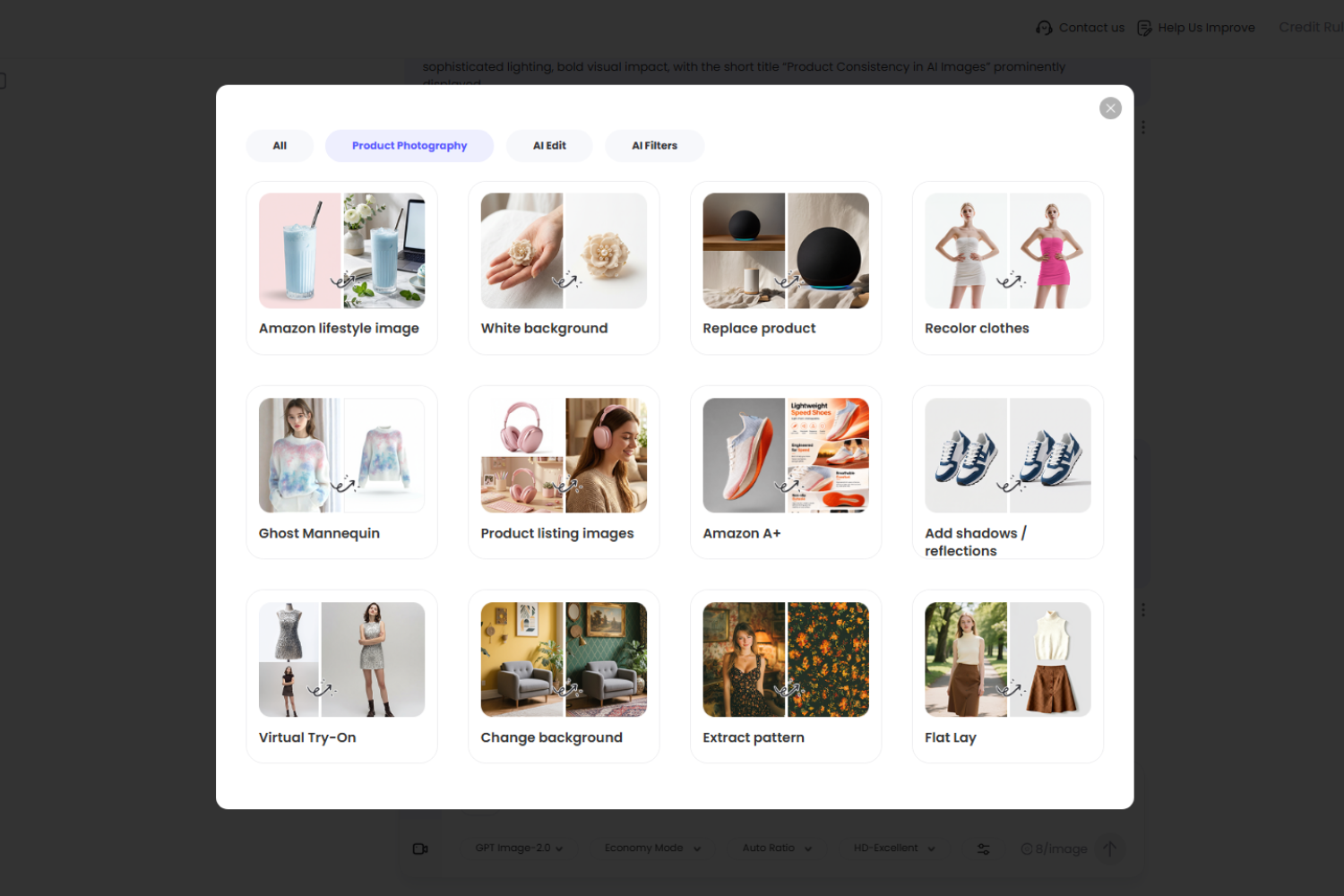
PicWish also provides high-consistency AI models for product photography, with its current product-photo workflow highlighting models such as Nano Banana Pro and GPT Image 2.0 for maintaining product details across generated visuals.
3. Create Different Scenes From the Same Product
Once you have a suitable product reference, you can create different visual concepts for the same item. PicWish AI Designer can process up to five generations simultaneously, making it easier to explore multiple scene variations without generating each one separately.
For example, the same product could be presented as:
- A clean ecommerce product photo
- A lifestyle scene
- A seasonal campaign image
- A social media creative
- An advertisement
![product consistency in ai images examples]()
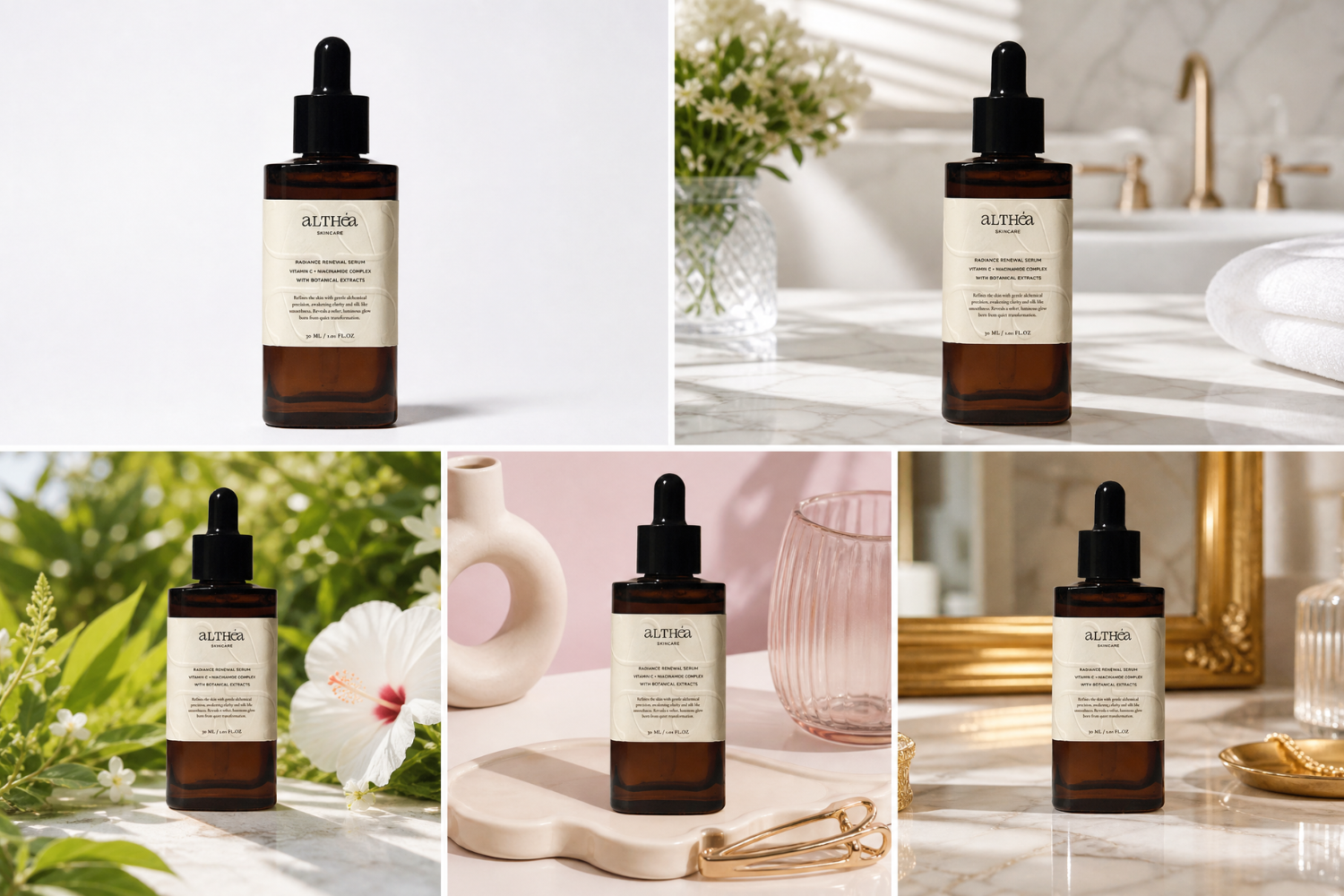
The product remains the central reference while the surrounding environment changes.
4. Compare the Results With the Original
After generating a new image, compare it with the original product before publishing it.
Check the same details every time:
Shape → Proportions → Color → Material → Logo → Packaging → Labels → Features
If an important characteristic has changed, refine the prompt or generate another version. You can use the Regenerate button to create another version when a result does not meet your requirements. If the result is close to what you want, Continuous Editing lets you continue refining the generated image.
For prompt refinement, you can also enable Keep Text after Send in Preferences to keep your previous prompt available after sending it, making it easier to adjust the instructions for another generation.
5. Repurpose Consistent Product Visuals
Once you have a collection of consistent images, you can adapt them for different marketing channels.
For example, the same product visuals can be used for:
- Product listing images
- Social media posts
- Advertisements
- Promotional campaigns
- Website visuals
This can help ecommerce sellers create more marketing assets from a single product photo instead of arranging a new photoshoot for every visual concept.
Product Consistency Checklist
Before publishing an AI-generated product image, compare it with the original reference.
| Product Element | What to Check |
| Shape | Is the original shape preserved? |
| Proportions | Are the dimensions consistent? |
| Color | Is the original color maintained? |
| Material | Does the material still look accurate? |
| Logo | Is the logo unchanged and correctly positioned? |
| Packaging | Is the packaging accurate? |
| Labels | Are important labels and text preserved? |
| Features | Are the product’s distinctive features unchanged? |
If an important detail has changed, refine the generation before using the image commercially.
FAQs
📍 Can I use one product image to create multiple AI-generated scenes?
A single high-quality product reference can be used as the basis for different environments, such as lifestyle, seasonal, studio, and promotional scenes, while keeping the product itself consistent.
📍 What product details are most important to preserve in AI-generated images?
The most important details are those that define the product’s identity, including its logo, packaging, distinctive shape, color, proportions, material, and unique features. Preserving these details helps ensure that the AI-generated image still accurately represents the original product
📍 Can I maintain product consistency when changing the camera angle?
It can be more difficult to maintain product consistency when changing the camera angle because AI may reinterpret parts of the product that were not visible in the original reference. For important product visuals, use reference images that show the product clearly from the desired angle or keep changes to the camera perspective subtle.
📍 How many reference images should I use for consistent AI product images?
Start with one clear, high-quality product reference whenever it provides enough information to identify the product. If the AI needs more visual information about the product, additional references showing important details or different views may help, depending on the image generator you use.
📍 Should I use the same prompt for every product image?
Not necessarily. Keep the product description and fixed details consistent, but change the parts of the prompt that describe the desired scene, lighting, composition, or campaign style. This allows you to create varied visuals without unnecessarily changing the product.
Conclusion
AI can make product photography more flexible, but product consistency still matters. The product should remain the fixed element while AI changes the surrounding scene. By maintaining a clear reference and ensuring the core product details stay unchanged, you can generate multiple variations without losing accuracy. Tools like PicWish AI Designer can also help turn a single product photo into different scenes using prompts and templates while preserving high consistency.



Leave a Comment