

- Why and When Do Wedding Photos Need Enhancement
- Best Wedding Photo Editors Online
- FAQs About Enhancing Wedding Photos
Why and When Do Wedding Photos Need Enhancement
Wedding photos may need enhancement when they don’t fully capture the beauty of the moment. This can happen if lighting is poor, indoor or evening shots are too dark, or colors look uneven. Close-up photos may show blemishes, tired eyes, or uneven skin tones, and some images may be blurry or low-resolution. Backgrounds can also be distracting, taking focus away from the couple. To fix these issues, you have to learn how to enhance wedding photos by brightening and balancing colors, smoothing skin naturally, sharpening details, and cleaning up backgrounds so every photo looks polished and timeless.
Best Wedding Photo Editors Online
PicWish
PicWish is an AI photo editor, accessible on browsers, desktop, and mobile devices, that helps you how to enhance your wedding photos and get creative with them. With its Enhance Photo, you can remove blur, fix lighting, and make your wedding images brighter and sharper upon upload of the image.
Key Features
- Beginner-friendly
- Supports batch editing (Up to 30 images)
- Fully automatic, no need for manual editing
- Offers enhancement models for accurate enhancement of different image types
- Provides Colorize option and Beautify filters
Pros
- Free to use
- No watermark upon download
- Fast and high-quality results
Cons
- Advanced enhancement option requires payment to use
- Less control over specific parts of the image for detailed edits
How to enhance wedding photos with PicWish’s Photo Enhancer:
- First, visit the Photo Enhancer page of PicWish and upload your wedding image.
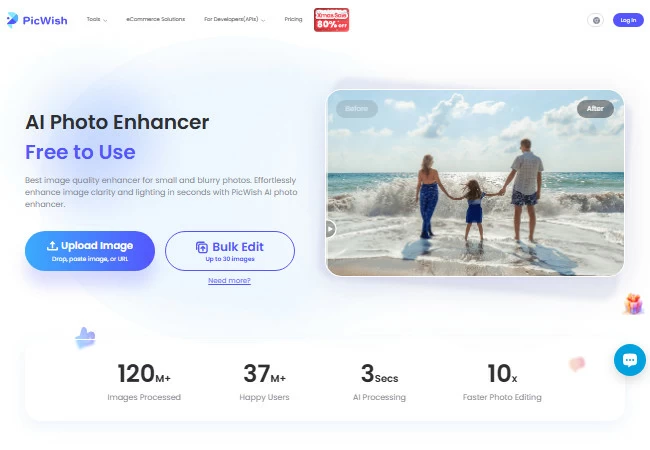
- Upon upload, PicWish will automatically enhance your image. Once satisfied with the result, click Download Image to save it.
![picwish photo enhancer wedding photo result]()

For creativity, its PicWish AI Designer lets you retouch faces in your wedding photos, remove people in the background, change poses, and create wedding layouts for albums or social media just by entering a prompt. Aside from that, it offers a wide variety of presets that provides a pre-configured prompt with the most ideal AI model. This PicWish feature is practically an all-in-one tool of its own. You can remove stickers, colorize line art, remove double chin, and even do Amazon listing images.
Key Features
- Easy to navigate
- Supported by AI models: Gemini 2.5, Gemini 3, Seedream 4.0, Seedream 4.5, GPT Image-1, GPT Image-1.5, and Flux Kontext
- Lets users choose a specific aspect ratio for the image that will be generated
- Provides Edit button that allows users to switch to other editing tools without losing their progress
- Includes a Use as Reference option to reuse the same image across edits
Pros
- Offers 2 free uses everyday
- Prompt-based
- Free of watermarks upon download
Cons
- Very complex images may require multiple processing attempts
- Limited options for advanced, layer-based editing
How to enhance wedding photos with PicWish’s AI Designer:
- Go to the PicWish AI Designer page.
![picwish ai designer page]()

- Upload your image.
![picwish ai designer upload wedding photo]()

- Next, think of how you want to enhance your image and enter your prompt, or you can choose among the presets offered.
![picwish ai designer choose preset]()

- After that, hit send and wait for the result to generate.
![picwish ai designer enhancement process]()

- Check the image result and once satisfied, click Download.
![picwish ai designer enhanced wedding photo result]()

Remini
Remini is an AI-powered photo enhancer that specializes in improving blurry, low-resolution, or old wedding photos. It’s perfect for restoring details, sharpening faces, and bringing life back to faded or pixelated images. With its automatic AI tools, anyone can quickly turn imperfect wedding shots into clear, polished memories.
Key Features
- Supports Face Enhancement option with Beautify filters.
- Allows users to enhance background of their wedding photos
- Offers Color Correction upon enhancement
- Provides batch editing
Pros
- Simple user interface
- Automatic process and fast results
Cons
- Some images might have distortion after enhancement
- Contains watermarks upon download
- Download requires paid subscription
- Not designed for complex, professional-level edits
How to enhance wedding photos with Remini:
- First, go to the official website of Remini’s AI Photo Enhancer then click Try Remini.
![remini ai page click try remini]()

- Click Choose files or drag and drop your wedding photo to upload your image.
![remini click choose files to upload image]()

- Wait for the process to finish. Once done, click Download to save it.
![remini ai enhanced wedding photo result]()

Fotor
Fotor is a simple online photo editor that helps you quickly enhance wedding photos without any complicated tools. It’s best for basic fixes like improving colors and lighting, smoothing skin, removing small background distractions, and adding filters or effects to make your photos look more polished. Fotor works well if you want quick, attractive improvements without steep learning curves.
Key Features
- One‑click improvement of color, contrast, lighting, and overall quality.
- Supports batch editing
Pros
- Very easy to use, great for beginners and casual editors.
- Offers essential enhancement tools for free.
- Works in a browser, no installation needed.
Cons
- Users might experience upload errors due to strict file size image requirements.
- Many advanced tools and templates are behind a paid plan.
- Ads and upgrade prompts can interrupt editing on the free version.
- Lacks deep professional tools like multi‑layer edits found in advanced software.
How to enhance wedding photos with Fotor:
- Visit Fotor’s Photo Enhancer page, then click Enhance Photo to upload your wedding image.
![fotor ai photo enhancer page]()

- Check the human verification box to continue. After that, the enhancement process will start automatically.
![fotor ai photo enhancer human verification box]()

- Once the process is finished, check the image result and click the download button.
![fotor ai enhanced wedding photos result]()

FAQs About Enhancing Wedding Photos
1. What’s the Best AI Wedding Photo Editor?
The best AI wedding photo editor is PicWish. It enhances photos, smooths skin, cleans backgrounds, and lets you create albums, invitations, and social media posts quickly.
2. How Do I Enhance Wedding Photos?
Upload your photo to an AI editor like PicWish, use the AI Photo Enhancer for clarity and color, adjust the background if needed, and download the final image.
3. Can I Enhance Old or Blurry Wedding Photos?
Yes. Tools like Remini or PicWish can sharpen details, increase resolution, and restore clarity in older or low-quality images.
4. Do I Need Editing Skills to Enhance Photos?
No. Most AI photo editors are beginner-friendly and automatically improve lighting, colors, and sharpness with just a few clicks.
5. Can I Use Enhanced Photos for Prints and Albums?
Absolutely. After enhancing, you can download high-quality images suitable for prints, albums, invitations, or sharing online.


Leave a Comment