

Watermarks can ruin an otherwise perfect image—whether it’s a stock photo, social media post, or personal picture. Manually removing them can be frustrating, especially if you don’t have professional editing skills.
Fortunately, modern AI tools make it easy to remove watermark from photo online in just a few clicks. These tools automatically detect and erase unwanted elements while reconstructing the background naturally.
In this guide, we compare the best watermark remover tools in 2026, helping you find the fastest and most effective way to clean up your images.
Top Watermark Remover Tools at a Glance
| Tool | Best For | Free Option | Key Strength |
|---|---|---|---|
| PicWish | All-purpose removal | Yes | AI precision |
| HitPaw | Video & image | Limited | Multi-format |
| Fotor | Beginners | Yes | Simple UI |
| Apowersoft | Batch removal | Limited | Bulk processing |
| Inpaint | Manual editing | Limited | Precision control |
| Cleanup.pictures | Quick edits | Yes | Fast removal |
| Canva | Design workflow | Limited | Integrated editing |
How to Choose the Best Watermark Remover
- AI accuracy: Natural background reconstruction
- Ease of use: One-click vs manual tools
- Image quality: Minimal artifacts
- Speed: Fast processing
- Extra features: Batch, formats, editing tools
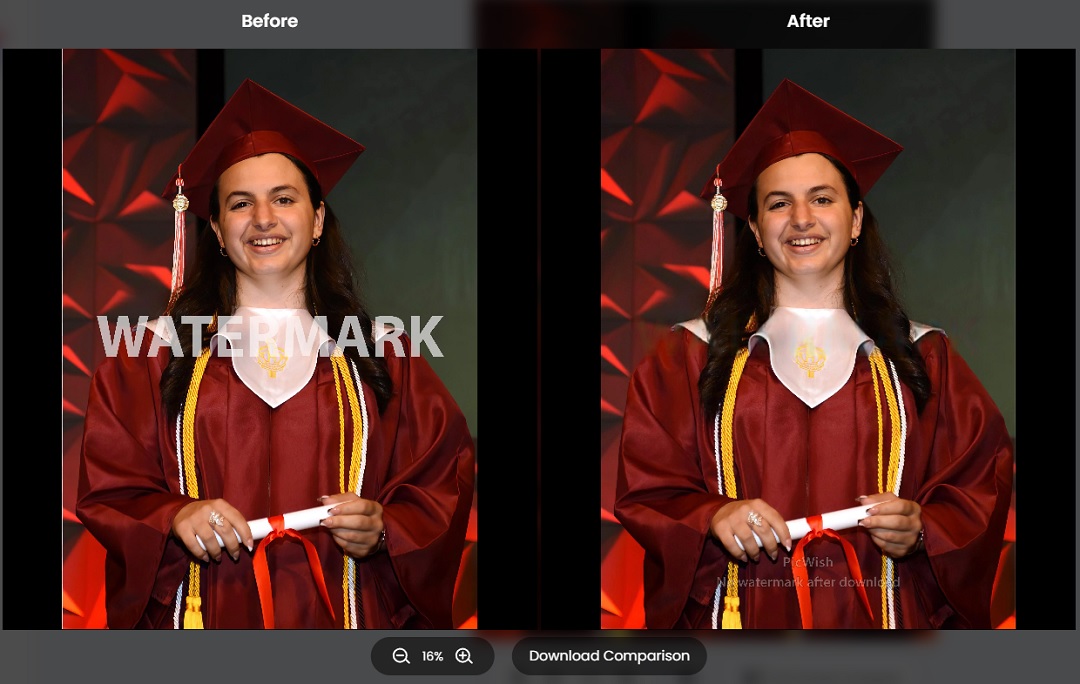
1. PicWish – Best Overall AI Watermark Remover
PicWish is one of the most efficient AI tools for removing watermarks from photos online. It uses advanced object removal technology to erase logos, text, and unwanted elements while intelligently filling in the background.
This makes it ideal for both simple and complex watermark removal tasks, especially when the background contains textures, gradients, or patterns.

Key Features:
- AI-powered watermark and object removal
- Smart background reconstruction
- One-click workflow
- Supports multiple formats
Best For: Logos, text overlays, complex backgrounds
Pricing: Free with premium options
Pros: Fast, accurate, easy to use
Cons: Limited manual editing
2. HitPaw – Best for Video & Image Watermarks
HitPaw is a versatile tool that supports both image and video watermark removal. It provides multiple AI modes to handle different types of overlays.

Key Features:
- Supports video and image editing
- Multiple removal modes
- Preview results
Best For: Mixed media projects
Pricing: Free trial
Pros: Multi-purpose
Cons: Paid required for full use
3. Fotor – Best Beginner-Friendly Tool
Fotor offers a simple interface for removing watermarks using AI-assisted tools. It’s ideal for users who want quick results without complexity.

Key Features:
- Brush-based removal
- AI enhancement tools
- Full editing suite
Best For: Quick edits
Pricing: Free + premium
Pros: Easy to use
Cons: Less precise
4. Apowersoft – Best for Batch Processing
Apowersoft is designed for users who need to remove watermarks from multiple images at once. Its batch processing feature saves time for large projects.

Key Features:
- Batch watermark removal
- Simple interface
- Fast processing
Best For: Bulk editing
Pricing: Limited free use
Pros: Efficient for large tasks
Cons: Limited free features
5. Inpaint – Best for Precision Editing
Inpaint allows more precise control over watermark removal. Users can manually select areas for removal and fine-tune results.

Key Features:
- Manual selection tools
- Advanced reconstruction
- Detail-focused editing
Best For: Detailed editing
Pricing: Paid
Pros: High precision
Cons: Less beginner-friendly
6. Cleanup.pictures – Best for Quick Fixes
Cleanup.pictures is a lightweight online tool focused on speed. You simply brush over the watermark and the AI removes it instantly.

Key Features:
- Fast processing
- No sign-up required
- Instant results
Best For: Quick edits
Pricing: Free
Pros: Very fast
Cons: Limited features
7. Canva – Best for Design Workflows
Canva integrates watermark removal into its broader design platform, allowing users to edit, design, and export images in one place.

Key Features:
- Integrated design tools
- Background editing
- Template support
Best For: Designers and marketers
Pricing: Freemium
Pros: All-in-one platform
Cons: Not specialized
Tips for Removing Watermarks Cleanly
- Use high-resolution images
- Select watermark areas carefully
- Avoid complex overlays when possible
- Use AI tools with reconstruction
Frequently Asked Questions
1. Can I remove watermark from photo online for free?
Yes, many tools offer free versions with limitations.
2. Will image quality be affected?
High-quality AI tools preserve most details.
3. What is the best tool?
PicWish is one of the most balanced options.
4. Is watermark removal legal?
Always ensure you have usage rights before editing.
5. Can AI remove logos completely?
Yes, in most cases AI can remove logos effectively.
Final Thoughts
Removing watermarks is easier than ever with AI tools. Whether you need quick fixes or detailed edits, there’s a solution for every use case.
Start with PicWish AI Tool for fast and reliable results.




Leave a Comment