
What Images Do You Need for an Amazon Listing?
A high-converting Amazon product listing usually includes multiple image types, each serving a specific purpose.
The most important Amazon listing images include:
- Main product image (white background, Amazon-compliant)
- Lifestyle image (showing the product in real use)
- Feature highlight image (key benefits and selling points)
- Comparison image (vs competitors or older versions)
- Dimensions image (size, capacity, measurements)
- Close-up detail image (materials, texture, craftsmanship)
- Brand storytelling image (brand identity and trust-building)
Amazon allows up to 9 images in many categories.
The more strategic your visuals are, the better your chances of increasing clicks and conversions.
Why Amazon Listing Images Matter So Much
On Amazon, shoppers make decisions fast.
Before reading your bullet points or product description, they see your images first.
Strong product visuals can help you:
- increase click-through rate (CTR)
- improve conversion rate
- reduce customer hesitation
- communicate product value instantly
- build trust
- reduce returns through better product clarity
Weak visuals can kill sales — even if your product is excellent.
Traditional Product Photography vs AI Image Generation
Traditional Method
Creating Amazon product images traditionally often requires:
- professional product photography
- studio setup
- models
- graphic design
- retouching
- multiple revisions
Challenges:
- expensive
- slow
- difficult to scale
- hard to test multiple creative versions
AI-Powered Method
With an Amazon listing image generator, you can:
- upload a product image
- remove backgrounds automatically
- generate professional scenes
- create lifestyle visuals
- build infographics
- produce multiple listing creatives fast
Benefits:
✅ faster workflow
✅ lower costs
✅ scalable for multiple SKUs
✅ ideal for ecommerce sellers
✅ easier A/B testing
In 2026, AI has become one of the smartest ways to create Amazon visuals.
How to Create Amazon Listing Images with AI
1. Upload Your Product Photo
Start with a clear product image.
Even a smartphone photo can work if your AI tool supports enhancement and cleanup.
2. Remove the Background
Amazon requires the main image to have a pure white background in most categories.
AI tools can instantly:
- remove the background
- clean image imperfections
- improve sharpness
- optimize composition
3. Generate Lifestyle Images
Lifestyle images help customers imagine owning your product.
Examples:
- skincare product in a luxury bathroom
- kitchen gadget in use
- headphones worn by a real person
- pet product in a natural home setting
These images often improve engagement significantly. 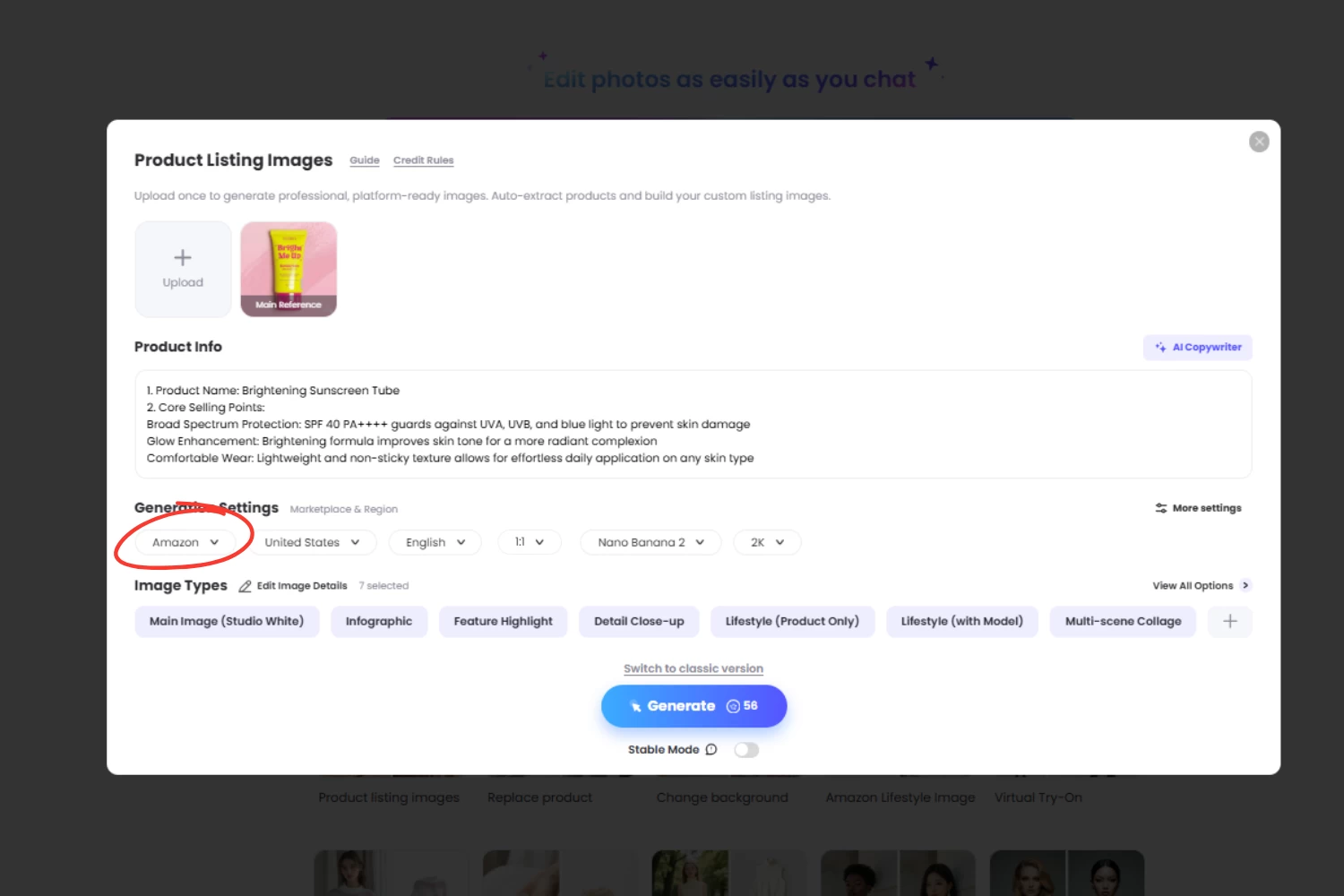
4. Create Feature Graphics
Use AI to generate informative product visuals.
Examples:
- product benefits
- callouts
- icons
- dimensions
- feature comparisons
This helps shoppers understand your offer instantly.
5. Test Multiple Creative Versions
One of AI’s biggest advantages is speed.
You can test:
- premium look
- minimalist aesthetic
- luxury branding
- bold ad-style visuals
- younger lifestyle concepts
Better testing = better conversion optimization.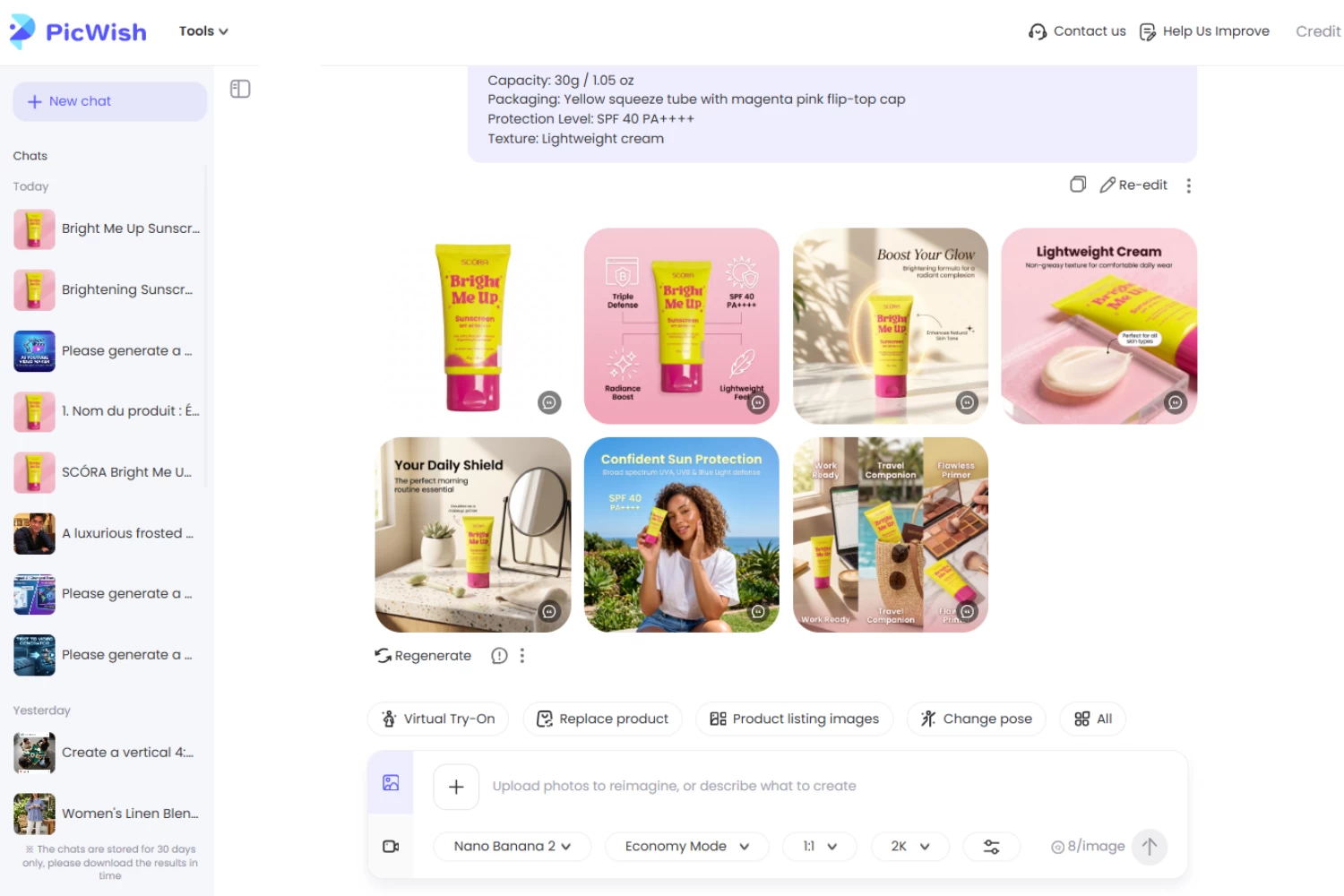
Best Amazon Listing Image Generator Tools
Several tools can help sellers create Amazon product visuals.
PicWish
Best for:
- background removal
- AI product photo generation
- lifestyle scene creation
- product cleanup
- ecommerce-focused visual workflows
Strong option for Amazon sellers who need speed.
Canva
Good for manual design work.
Less specialized for e-commerce listing automation.
Fotor
Useful for marketing visuals and ad creatives.
Less Amazon-specific.
Adobe Express
Powerful but can be more design-heavy.If your goal is to create Amazon listing images quickly and efficiently, a specialized ecommerce-focused AI tool usually works best.
FAQ About Amazon Listing Images
📌 Can I use AI-generated images on Amazon?
Yes, as long as your images comply with Amazon’s listing policies.
Main product images must follow Amazon rules, including:
- white background
- accurate product representation
- no misleading elements
Secondary images offer more creative flexibility.
📌 What size should Amazon listing images be?
- Amazon recommends: At least 1000 x 1000 pixels
- For zoom functionality: 1600 pixels or larger is ideal
Higher-quality images improve user experience.
📌 How many images should an Amazon listing have?
Best practice: 7 to 9 images
A complete gallery usually converts better because it answers more buyer questions visually.
📌 What is the best Amazon listing image generator?
It depends on your workflow.
- For ecommerce sellers who need fast AI-generated product visuals, tools like PicWish can be highly efficient.
- For broader design work, Canva or Adobe Express may fit.
📌 Can I create Amazon lifestyle images without a photoshoot?
Yes. AI can generate realistic product lifestyle images from a simple product photo.
This saves:
- time
- photography costs
- studio setup
- editing work
📌 Do better Amazon images increase sales?
In many cases, yes. Better visuals can improve:
- click-through rate
- buyer confidence
- product understanding
- conversion rate
Product imagery directly impacts buying behavior.
📌 Can I create Amazon images for free?
Some AI tools offer free trials or limited free credits. However, professional-quality commercial visuals often require premium tools.
Final Thoughts
Creating high-converting Amazon product images no longer requires expensive photoshoots. An Amazon listing image generator allows sellers to create professional product photos, lifestyle images, and ecommerce creatives faster, cheaper, and at scale. Tools like PicWish make the entire process simple with AI.


Leave a Comment