

What Is Product Catalog Management?
Product catalog management is the process of organizing, maintaining, and updating product information across different sales channels. A product catalog usually includes details such as:
- Product names
- Descriptions
- Pricing
- SKUs (Stock Keeping Units)
- Categories
- Inventory information
- Product specifications
- Product images
For e-commerce businesses, this is especially important because customers rely heavily on product details and visuals when deciding what to buy.
Why E-commerce Product Catalog Management Matters
As online stores grow, it gets harder to keep product information organized. But with a well-structured catalog, everything becomes much easier and more manageable. It helps customers find what they need faster through clear details and images, improves search visibility with consistent product data, and boosts sales by building trust and confidence. It also keeps product information aligned across different selling channels and makes it quicker and simpler to update things like prices, descriptions, images, and stock levels.
Common Product Catalog Management Challenges
Even though it’s important, many businesses still find product catalog management challenging. 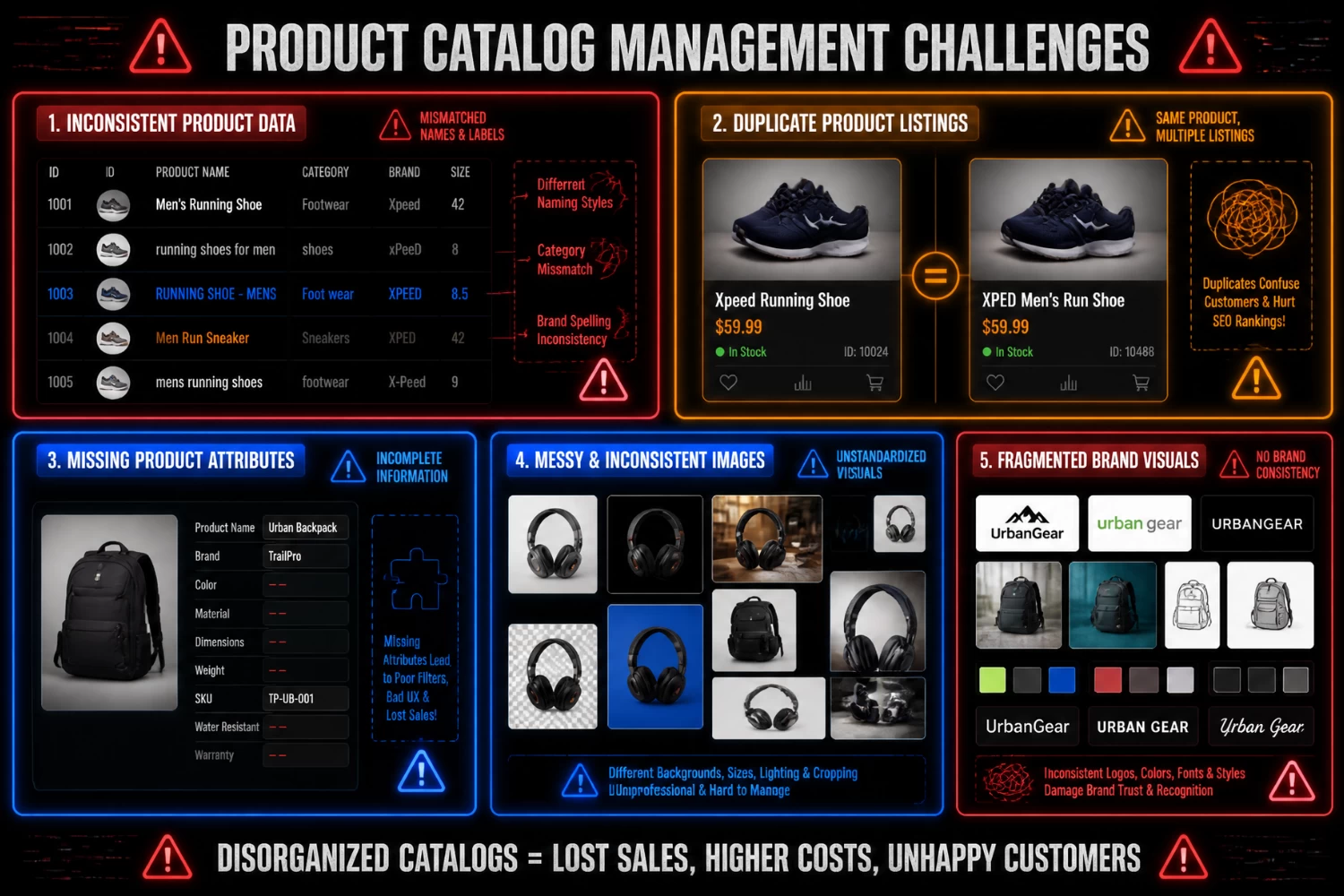
- Inconsistent Product Information: Different team members may use different naming styles, product descriptions, or category setups, which can lead to confusion and inconsistency.
- Duplicate Listings: As catalogs grow, duplicate product listings can start to appear across different categories or sales channels, making them harder to manage.
- Missing Product Attributes: Missing or incomplete information can hurt the customer experience and lower the chances of making a sale.
- Managing Large Volumes of Product Images: Product images are often one of the most time-consuming parts of catalog management. Businesses need to make sure photos stay consistent in background, size, quality, and style.
- Maintaining Brand Consistency: When product photos come from different sources, it becomes harder to keep a clean, professional, and consistent look across the entire catalog.
Best Practices for Product Catalog Management
Handling a small online store or a large e-commerce operation comes with its own challenges, but these best practices can help improve product catalog management efficiently. 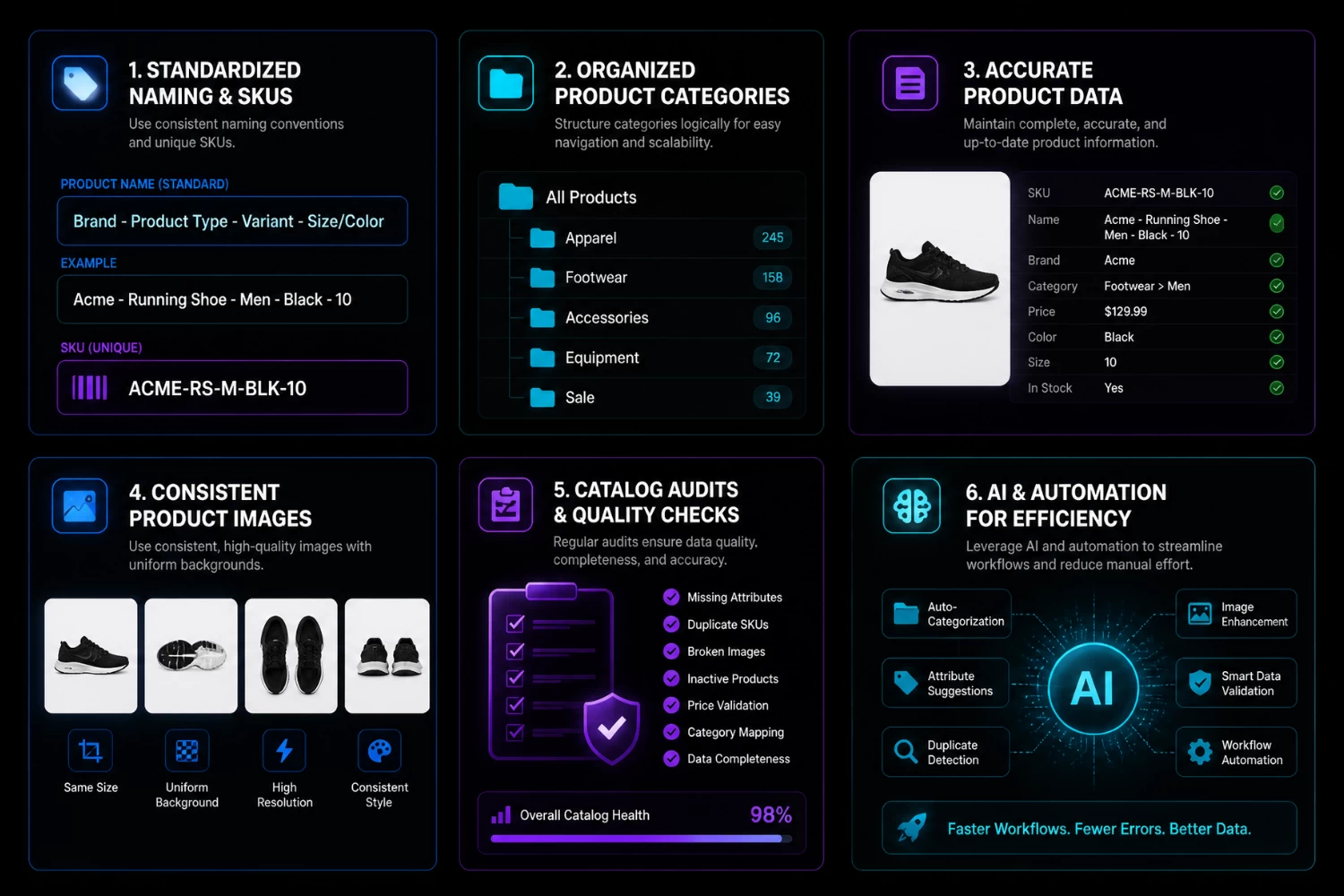
- Create Standard Naming Conventions: Use consistent naming styles for products, categories, and SKUs to make catalog management easier and more organized.
- Maintain Accurate Product Data: Regularly check product information to make sure descriptions, specifications, and prices are still accurate.
- Organize Products Into Clear Categories: A clear and logical category structure also helps customers find products faster and makes the website easier to navigate.
- Establish Image Guidelines: Set clear standards for image size, background, lighting, and positioning to keep everything consistent across the catalog.
- Audit Your Catalog Regularly: Doing regular reviews helps catch outdated information, duplicate listings, and image issues before they affect customers.
- Use Automation Where Possible: AI tools can also help speed things up by handling repetitive tasks like image editing, resizing, and background removal, making catalog management much more efficient.
How AI Can Simplify Product Catalog Management
 Manually managing product images can take a lot of time, especially for stores with large inventories. AI tools help simplify this by automating repetitive editing tasks and making product catalog management more efficient. Many AI image tools are designed to help e-commerce businesses prepare, organize, and improve product images more easily.
- Remove Backgrounds Quickly – AI background removal tools, for example, can quickly remove distracting backgrounds and leave clean, consistent product photos that look better across listings.
- Process Images in Bulk – For large catalogs, batch processing is also useful since it allows multiple images to be edited at once, saving a lot of time when preparing products for upload.
- Standardize Image Dimensions – Consistent image sizing is another important factor, and AI resizing tools make it easier to standardize images across different platforms, marketplaces, and ads.
- Enhance Product Images – AI can also enhance product photos by improving sharpness, clarity, and lighting so products look more appealing while still accurate.
- Add Realistic Shadows and Effects – Some tools even add natural-looking shadows and subtle effects that make product images look more polished and professional.
By automating these tasks, businesses can spend less time editing images and more time focusing on improving their catalog, products, and overall customer experience.
The Role of Product Images in E-commerce Product Catalog Management
While many businesses focus on product data, product images are just as important in product catalog management. Product photos help customers understand the product, see its features, and trust the brand. But if the images are inconsistent, even a well-organized catalog can look unprofessional.
Some common image issues include:
- Different background styles
- Inconsistent image sizes
- Poor lighting
- Low resolution
- Distracting elements
- Uneven product positioning
These problems can lead to a messy shopping experience and make the catalog harder to manage. Keeping product images consistent across the catalog helps create a more polished look and builds more confidence in customers.
5 AI Tools to Improve Product Catalog Management
AI tools can help e-commerce businesses address common catalog management challenges such as maintaining image consistency, updating large product inventories, and ensuring high-quality product presentations. Here are five solutions that can support product catalog management workflows:
1. PicWish
PicWish is an AI photo editing tool that has a wide range of features that are designed for creating and enhancing e-commerce photos in the easiest and fastest way possible. This tool helps to simplify editing large numbers of product photos to make the workflow productive and efficient.
Key features:
- Remove Background with options to replace backgrounds with solid colors, upload custom backgrounds, and add realistic shadows
- Enhancer Photo for sharpening details, improving clarity, and increasing image resolution
- Product Retouch for removing unwanted objects, blemishes, wrinkles, and other distractions from product photos
- Image Enlarger for increasing image resolution while preserving image quality and details
- Batch Editing support across all the features above, allowing you to remove backgrounds, enhance images, retouch products, and enlarge multiple images at once
- Studio Background for placing products in professionally generated scenes and backgrounds without the need for a photoshoot
- Recolor Product for changing product colors and creating multiple color variations from a single image
- AI Virtual Try-On for visualizing clothing on AI-generated models in different styles and appearances
- Amazon Listing Images for generating marketplace-ready product images with promotional layouts, feature highlights, and infographics
2. Canva
Canva is a design platform that combines image editing, content creation, and branding tools in one place. It can be used to create product images, marketing materials, and catalog assets while keeping visuals consistent across different channels.
Key features:
- Magic Edit for adding, removing, or replacing elements in images using AI
- Bulk Create for generating multiple versions of a design using spreadsheet data
- Background Remover for isolating products and creating cleaner visuals
- Brand Kit for storing logos, fonts, colors, and other brand assets in one place
- Magic Resize for quickly adapting designs to different platforms and formats
- Templates Library with ready-made designs for catalogs, social media posts, presentations, flyers, and marketing materials
3. Adobe Express
Adobe Express includes AI-powered design and editing tools that help businesses create product visuals, enhance images, and produce marketing-ready assets for e-commerce.
Key features:
- Generative AI Tools with options to add, remove, extend, or replace elements in images using text prompts
- Background Removal with tools for isolating products and placing them on clean, custom, or branded backgrounds
- Quick Actions with options for resizing, cropping, converting file formats, and enhancing image quality in seconds
- Brand Management Tools with options to store and apply logos, colors, fonts, and brand assets across all designs
- Templates with options for product listings, banners, ads, social media posts, and other marketing materials
4. Photoroom
Photoroom focuses on product photography enhancement, helping businesses create clean, consistent, and catalog-ready product images. It’s especially useful for sellers handling large volumes of product photos.
Key features:
- AI Background Remover optimized for product photography with options for clean cutouts and background replacement
- Batch Mode for processing multiple product images at once with the same edits applied across all files
- AI-generated Backgrounds with options to place products in realistic scenes, studio-style setups, or custom environments
- Shadow and Lighting Tools with options to adjust shadow intensity, direction, and lighting for more realistic product presentation
- Export Options tailored for e-commerce platforms, marketplaces, and online store requirements with different size and format settings
5. Pixelcut
Pixelcut offers AI-powered tools for editing product images, helping businesses create clean, consistent, and professional-looking catalog visuals. It’s especially useful for improving and preparing product photos at scale.
Key features:
- AI Background Remover with options for clean cutouts and replacing backgrounds with solid colors or custom scenes
- Image Upscaler with options to enhance resolution, sharpen details, and improve overall image quality
- Batch Editing for applying the same edits across multiple product images in one go
- AI-generated Backgrounds with options to place products in studio-style setups, lifestyle scenes, or branded environments
- Magic Eraser for removing unwanted objects, distractions, or imperfections from product photos
When choosing an AI tool, it’s important to think about your catalog size, how your workflow is set up, what tools it can connect with, and your budget. Picking the right one can make catalog management much easier and help keep your listings consistent and high quality.
FAQs About Product Catalog Management
1. How do I know if my product catalog needs better management?
Your product catalog may need better management if you often find outdated prices, missing product details, duplicate listings, inconsistent product images, or products placed in the wrong categories. Another sign is when customers frequently ask basic questions that should already be answered on the product page.
2. What product information should every e-commerce catalog include?
Every e-commerce catalog should include clear product names, accurate descriptions, prices, SKUs, product categories, specifications, inventory details, and high-quality product images. Depending on the product type, you may also need size charts, material details, color options, usage instructions, warranty information, or shipping details.
3. How can I manage a large product catalog more efficiently?
To manage a large product catalog more efficiently, start by standardizing product data and image guidelines. Then, use tools that support bulk editing, automation, and regular catalog audits. This helps reduce manual work and keeps product information consistent across multiple listings or sales channels.
4. What is the best way to keep product images consistent?
The best way is to create clear image rules for your catalog, including background style, image size, product position, lighting, angle, and file format. For large catalogs, AI image tools can help apply the same edits to multiple product photos, making the catalog look cleaner and more professional.
5. How can product catalog management improve customer trust?
Customers are more likely to trust a store when product pages look complete, accurate, and consistent. Clear descriptions, correct specifications, updated prices, and professional product images reduce confusion and help customers feel more confident before buying.
6. What is the difference between product catalog management and inventory management?
Product catalog management focuses on organizing product information, such as titles, descriptions, images, categories, and specifications. Inventory management focuses on stock levels, product availability, and replenishment. Both are connected, but they do not serve the same purpose.
7. Can AI help with product catalog management?
Yes. AI can help simplify product catalog management by automating repetitive tasks, especially image-related work. For example, AI tools can remove backgrounds, resize product images, enhance photo quality, remove unwanted objects, create consistent studio-style backgrounds, and process multiple images in bulk.
For e-commerce teams, a tool like PicWish can be especially useful because it brings several product image editing features into one workflow. Businesses can use it to remove backgrounds, enhance product photos, retouch images, enlarge low-resolution visuals, recolor products, and create marketplace-ready listing images. This helps save time while keeping the product catalog cleaner, more consistent, and more professional.
8. What mistakes should e-commerce businesses avoid when managing a product catalog?
Common mistakes include using inconsistent product titles, uploading low-quality images, leaving important attributes empty, creating duplicate listings, forgetting to update prices or stock, and using unclear product categories. These mistakes can make the shopping experience confusing and reduce conversions.
9. When should a business start using a product catalog management tool?
A business should consider using a product catalog management tool when manual updates become too time-consuming, when product data is spread across different platforms, or when errors start appearing frequently. It is especially useful for stores with many SKUs, multiple sales channels, or large volumes of product images.
Conclusion
Product catalog management is an important part of running an online store. It keeps product information organized, improves the shopping experience, and makes managing products across channels easier. Product details and images both matter, and keeping them consistent helps your store look more professional and builds customer trust.



Leave a Comment